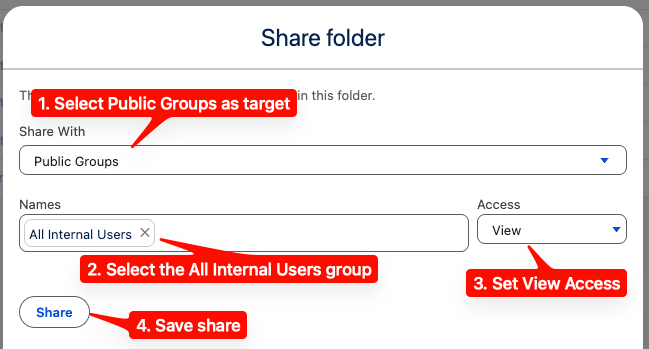

ShiftUp Reports folder with users in your org.
Sharing ShiftUp Reports
1
Navigate to Reports
Go to the
Reports tab, then select All Folders.2
Locate ShiftUp Reports folder
Look for the
ShiftUp Reports folder in the list.3
Open sharing options
Click the actions drop-down on the right of the row and select
Share.4
Share with All Internal Users
Share the folder with the
All Internal Users group.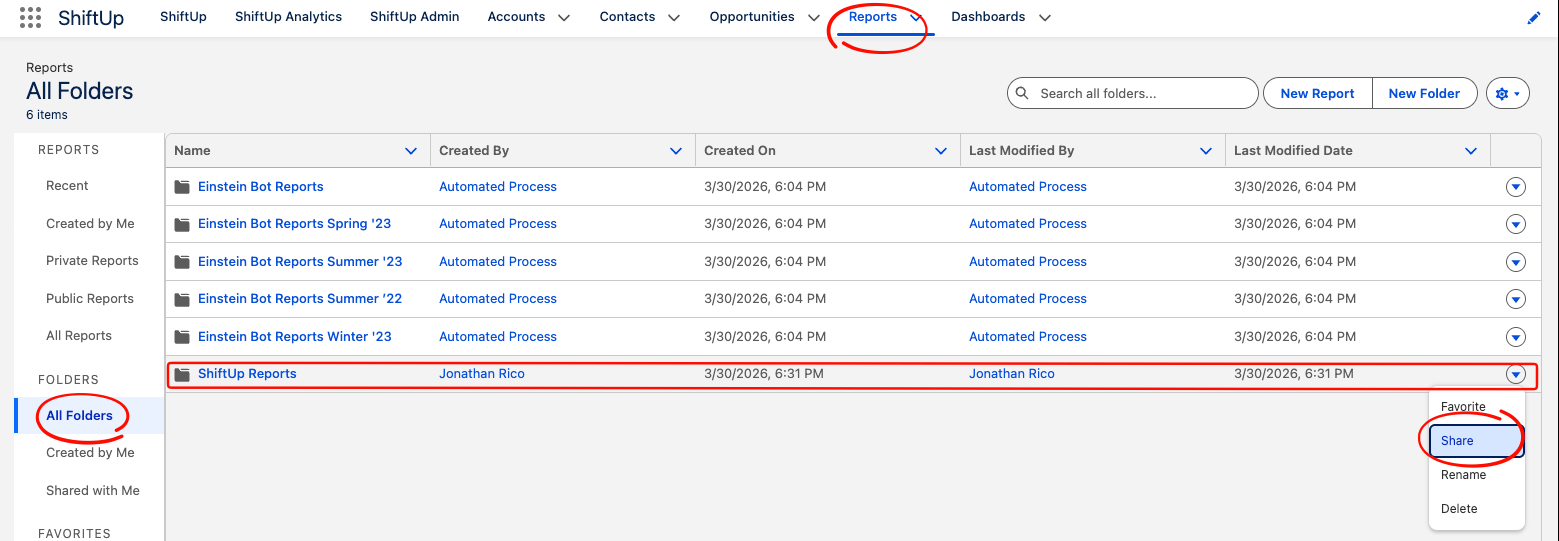
Stakeholder conversion source reports
The Adoption dashboard Stakeholders section includes two timeline widgets that link to packaged Salesforce reports in theShiftUp Reports folder through a View source report link in the widget footer.
The links render on both populated and empty timelines, and stay hidden when the packaged report cannot be resolved in the org.
Engage Outreach source reports
The Adoption dashboard in ShiftUp Analytics includes an Engage Outreach section that tracks completed ShiftUp Engage outreach cadence steps. Each widget in this section is backed by a packaged Salesforce report in theShiftUp Reports folder and links to it through a View source report link in the widget footer.
The widgets and reports count Engage steps completed after your org upgraded to this release. To include earlier Engage activity, run the Strategy Step Progress repair task under ShiftUp Admin → Advanced → Repair Tasks.
Who sees the View source report links
The View source report links appear only for users who have both:- The ShiftUp Admin permission set.
- The Salesforce Modify All Data permission.
ShiftUp Reports folder if you share it, but their results include only the records they can access.
Report types
The Engage source reports are built on two custom report types included in the package:- AI Opportunity Strategies Flat V1 backs the three strategy-level reports. It reports on ShiftUp Opportunity Strategies and includes Engage outreach adoption fields such as the date the first Engage step was completed.
- ShiftUp Engage Step Progress backs the three step-level reports. It reports on completed Engage outreach steps with strategy and account context.