

- High: Indicates an opportunity above average deal size, typically requiring executive sponsorship and cross-functional support to secure.
- Medium: Reflects the standard sales motion, aligning with the seller’s core customer profile and established transaction patterns.
- Low: Represents opportunities below the typical deal size or scope, usually following a more transactional or high-velocity path.
- Unknown: Applied when current buyer signals or seller context are insufficient to accurately benchmark the opportunity’s potential value.
Where strategies come from
Most Sales Strategies are surfaced automatically as ShiftUp analyzes an Account Plan and its intelligence. You can also ask ShiftUp to draft one on demand when the angle you want to pursue isn’t already on the plan — click Request strategy on the plan’s Strategies tab and reply in Chat to pick one of the two suggested directions or supply your own. See Request a strategy. For continuous, goal-driven discovery across your territory rather than a one-off request on a single plan, use Pipeline agents.Strategy types
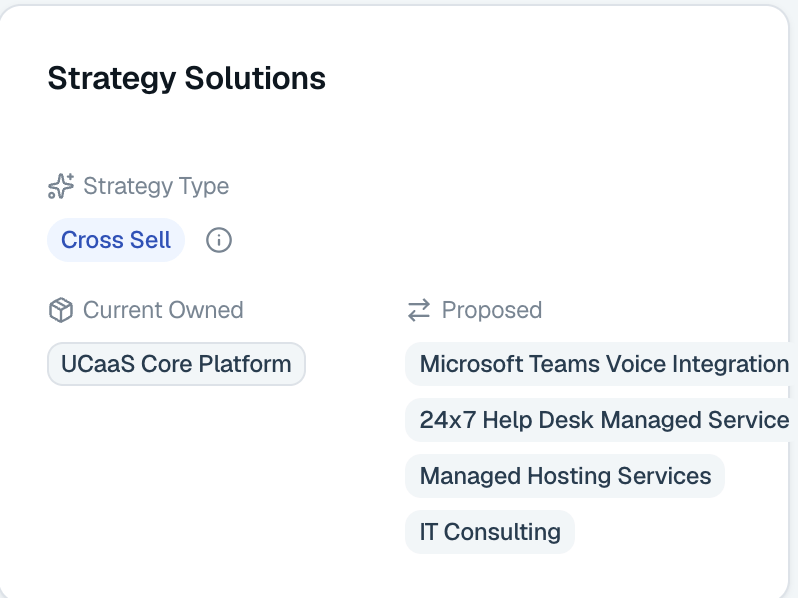
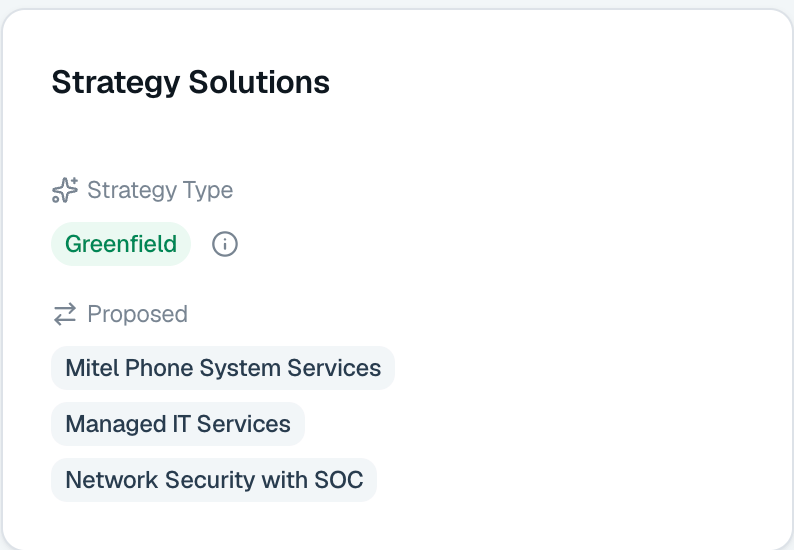
Every Sales Strategy is tagged as either Greenfield or Cross-sell, shown on the Solution card in the strategy overview. Both types share the same components below; the difference is which motion ShiftUp tailors the content for.- Greenfield — Targets a new logo. Content is framed around introducing your solution to an account that does not yet buy from you.
- Cross-sell — Targets expansion inside an existing customer. Content is framed around selling additional products or services on top of the relationship you already have.
How existing customers are identified for Cross-Sell
For cross-sell to trigger, ShiftUp needs to confirm the account is an existing customer. It uses multiple sources:- ShiftUp Research — Public or internal mentions that explicitly associate the account with your company as a customer.
- Account Notes and Intelligence — Qualitative signals across Account Notes that confirm an established customer relationship.
- Won Opportunities — Closed-won opportunities and the products purchased. Requires CRM Context Providers to be enabled.
The Sales Strategy Components
Overview: The “Why” (Hypothesis, Pain, and Urgency). Engage: The “How” (Step-by-Step Engagement Plan). Stakeholders: The “Committee” (Who matters and why). Business Case: The “Financial Justification” (The Problem and Opportunity). MEDDPICC Scorecard: The “Risk Audit” (Identifying blind spots). Sources: The “Transparency” (All AI sources cited). Feed: The “Updates” (New intelligence applied to the strategy). Activity: The “Engagement” (All meetings, events, and tasks). Notes: The “Intel” (Account notes that influenced the strategy). History: The “Confidence” (Confidence Score timeline).Overview
The Sales Strategy Overview is a narrative. When read from top to bottom, it tells the story:‘We believe [Hypothesis] because you are struggling with [Pain Points]. We are the best fit because [Why Us], and we need to move now because [Why Act Now].’
Hypothesis-Driven Engagement (The “Mission”)
A targeted belief about how a specific solution will solve a customer’s business problem—such as protecting renewals or driving expansion—to create a “reason to act.”- What it includes: A concise strategy statement and the specific Business Outcomes the customer can anticipate
- User Takeaway: Use this Hypothesis to align the account team to drive consistency.
Why Change? (The Pain Points)
This section identifies why the “Status Quo” is no longer sustainable. It highlights the friction or risks the customer is currently facing that prevent them from reaching the outcomes mentioned in the hypothesis.- What it includes: A description of the problem, the Level of Severity (Low/Med/High/Critical), and the quantifiable Business Impact of doing nothing.
- User Takeaway: Use these points to build tension in your discovery calls and validate that the customer feels the same urgency.
Why Us? (The Solution & Differentiation)
These sections describe how your solution is uniquely positioned to solve the identified pain points and help customers achieve their goals.- What to Sell: The specific products, features, or services relevant to this account.
- Why We Win: Your unique value proposition. This highlights your Differentiators against competitors or an internal “build-it-ourselves” path.
- User Takeaway: This is your competitive moat. Use it to handle objections regarding other vendors or existing tools.
Why Act Now? (The Catalyst)
This provides the urgency required to turn a “someday” conversation into a “today” conversation.- What it includes: External or internal triggers—such as a merger, a contract expiration, a new CFO mandate, or a product rollout deadline.
- User Takeaway: Use to drive urgency, this is your “Close Date” driver.
Conversation Roadmap
The Conversation Roadmap is a step-by-step engagement plan designed to move an opportunity from initial discovery to a final decision. Instead of a generic sales process, each step is a targeted conversation with specific goals, stakeholders, and outcomes. What is found in each step of the Roadmap?- Targeted Purpose: A clear “Why” for the meeting. This ensures the seller knows exactly what needs to be validated (e.g., confirming executive priorities) and what needs to be aligned (e.g., success criteria).
- Strategic Stakeholder Mapping: A list of specific people or roles that must be in the room to move the deal forward. This helps avoid “single-threading” and ensures both Economic and User Buyers are involved early.
- Structured Agenda: A high-level talk track that focuses on the prospect’s current reality, urgency, and the “Future State” they want to achieve.
- Actionable Outcomes: A set of completed goals that define a successful meeting. This moves beyond “good vibes” to clear commitments, such as naming owners for a technical workshop or defining the scope of a pilot.
- Actions to Move Forward: identifies the immediate, high-priority tasks required to maintain momentum.
- Meeting Flow: The Meeting Flow breaks the conversation down into specific time blocks. This prevents the “Discovery Trap”—where a seller spends the entire meeting on rapport or technical details, leaving no time for success criteria or next steps.
- Objections: This section equips sellers to handle common “deal-stoppers” specific to the account. Instead of defensive answers, it provides responses that pivot back to the business value.
Stakeholders
Stakeholder mapping identifies the key individuals involved in the decision-making process and categorizes them by their influence and role in the deal. This section ensures the seller is “multi-threaded”—connected to multiple people across different departments—to prevent the deal from collapsing if one contact leaves or goes silent. Stakeholders are present in the Conversation Roadmap or condensed into a list view on the Strategies tab. Clicking on a Stakeholder opens a right-side panel that expands on the insights in the list view and provides actions for Salesforce conversion and Engagement. Add a stakeholder from chat An Add Stakeholder button appears above the stakeholder list. Clicking it opens a short form: the stakeholder’s full name, plus an optional job title, LinkedIn URL, role (Champion, Economic Buyer, Blocker, Influencer, User, or Unknown), and notes. Click Start chat and ShiftUp opens Chat with your request, drafts the addition, and presents it as a review card — the stakeholder is added to the strategy only after you click Apply change. Once applied, ShiftUp researches the new stakeholder in the background to build out their profile. Confidence Score While the overall Strategy Confidence Score measures deal health, the Stakeholder Confidence Score measures the reliability of your contact data. This score indicates how certain we are that a stakeholder’s role, seniority, and contact information are accurate. Stakeholder Level Each stakeholder is assigned a Power Role based on their specific influence over the purchase decision and their primary concerns. Understanding these roles allows you to tailor your message and navigate the internal “Decision Committee” effectively.- Decision-Maker: The individual with final budget authority who approves the purchase based on high-level ROI and business outcomes.
- Influencer: A subject matter expert or leader who shapes the evaluation criteria and advises the Decision-Maker on the best path forward.
- User: The manager or team lead whose department will use the solution daily and whose buy-in is essential for long-term adoption.
- Gatekeeper: A representative from Legal, Security, or Procurement who controls specific approval gates and ensures compliance with company standards.
- Other: A contact involved in the communication or administrative chain who does not fall into the primary decision-making categories.
- High Influence: Executive leaders (VP+) who own the budget and provide the final “Yes” or “No” for the initiative.
- Medium Influence: Directors and Department heads who shape the evaluation criteria and manage the project’s strategic fit.
- Low Influence: Managers and execution owners who focus on daily usage, technical requirements, and internal adoption.
Stakeholder side panel
Clicking a stakeholder from the Stakeholders list or the Conversation Roadmap opens a right-side panel. The panel is where everything you do with that person lives: reading the full intelligence profile, reviewing recent public signals, drafting outreach, and running them through a cadence. It has four tabs: Overview The default tab. It shows the stakeholder’s contact details (phone, email, LinkedIn), their Influence, Trust level, and Engagement badges, tenure in the current role and company, an AI-written Summary, and — when ShiftUp has enough context — an Influence Insight, Personal Values & Goals, Background Summary, Education, and Previous Roles. If the stakeholder profile’s phone number differs from the linked Salesforce Contact’s, a warning icon appears next to the phone number. Hovering the icon reveals a tooltip explaining that the Salesforce record’s number is shown and listing the number the stakeholder profile has on file. The phone number itself is a button. Click it to open the Call preview dialog in Salesforce. See Call a stakeholder from a phone number. If your org has the phone-lookup add-on, a phone icon button sits next to the number (or the No data placeholder) for stakeholders linked to a Salesforce Contact or Lead. Click it to request or update the number without switching to the Actions tab. See Request a stakeholder’s phone number. Viewpoints Recent public signals for this stakeholder, filtered to what’s relevant to the current strategy. ShiftUp draws on social posts, press coverage, interviews and public quotes, event appearances, community or board activity, and company announcements. A count badge on the tab shows how many relevant viewpoints were found. Each item links back to its source. Use viewpoints to open a call with something specific and current, and to sanity-check the hypothesis and pain points against what the stakeholder is actually saying in public.Viewpoints only appear when you open the side panel from within a strategy — they’re scored against that strategy’s context. Opening the same stakeholder from a place with no strategy context falls back to the legacy Intelligence and Background tabs.
- Convert stakeholder to a Salesforce Contact or Lead so activity syncs back to your CRM. See Convert a stakeholder.
- Generate Email Message — an AI-drafted subject and body grounded in this strategy, this stakeholder’s role, and their viewpoints. See Generate an email or call.
- Generate Call Script — a talk track tailored to the stakeholder and the current stage of the strategy. See Generate an email or call.
- Request Phone Number Add-on — ask ShiftUp to look up a phone number for this stakeholder. See Request a stakeholder’s phone number below.
Call a stakeholder from a phone number
Placing a call from the Call preview requires a telephony solution that is fully enabled in your Salesforce org: an Open CTI softphone from your call center provider, or Salesforce Sales Dialer, with click-to-dial enabled for your user. ShiftUp hands the number to Salesforce’s native phone control and does not place calls itself. Without an enabled phone system, the preview still opens but the number renders as plain text, and the dialog directs you to your Salesforce admin to set one up.
- The phone number exactly as it will be handed to your phone system, including international formatting and extensions.
- The linked Salesforce Contact or Lead — its record name, type, and Id — or No record linked when the stakeholder is not linked yet.
- The native Salesforce phone control, which hands the number and record Id to your connected telephony provider when you click it.
Request Phone Number Add-on
Phone number lookup is a paid add-on. The tile only becomes actionable when your org has purchased the phone-lookup feature. Contact your ShiftUp account team to enable it.
- The Overview tab. A phone icon button sits inline next to the stakeholder’s phone number (or the No data placeholder). Click it to start the lookup.
- The Actions tab. The Request Phone Number tile launches the same lookup.
- One number found. The inline button turns into a green check; click it to open the Phone number found dialog and review the number before saving. Click Save to Contact or Save to Lead to write the number back to the linked Salesforce record. If the record already has a different number, the button reads Replace Contact phone / Replace Lead phone instead. On the Actions tile, the number appears with the same save button.
- Multiple candidates found. The dialog (or the Actions tile) lists each candidate as a radio option with a short label (for example, mobile vs. direct line). Pick one and save it to the Salesforce record. After saving, the dialog stays reachable to review the other numbers, and a Request new lookup button starts a fresh search.
- No number found. The inline button returns to its idle state with a No phone number found — click to try again tooltip; the Actions tile shows No phone number found. Click either to retry.
- Request failed or timed out. The inline button turns into a red alert icon; click it to open an error dialog with the underlying message, technical details, and a Retry button. The Actions tile shows Request failed or Request timed out with a See error(s) link.
Business Case
The Business Case serves as the financial and strategic justification for the sales strategy, moving beyond a simple hypothesis to provide a detailed “Why” for the investment. It frames the solution in the context of the customer’s broader corporate shifts, executive mandates, and the quantifiable cost of maintaining the status quo. Contained in the business case:- Problem Statement: A detailed analysis of the specific business friction, operational risks, or market shifts that make the status quo unsustainable.
- The Opportunity: A description of the “Ideal Future State” where organizational goals are realized.
- Why Act Now: Identifies the specific catalyst for urgency, linking the investment’s timing to external deadlines, competitive pressures, or recent organizational changes.
- Solution & Outcomes: Outlines how the proposed approach addresses identified gaps, improves leadership visibility, and provides a quantifiable, ROI-backed justification for the investment.
- ROI-backed justification for the investment.
Meddpicc Scorecard
The MEDDPICC Scorecard serves as a strategic risk audit and deal-readiness assessment tool. It provides a qualitative score that highlights deal health across seven critical dimensions, helping sellers identify hidden “deal killers” and bridge the gap between initial interest and a closed contract. Provided in this scorecard:- Metric-Driven Health: Each category (e.g., Metrics, Economic Buyer, Champion) is rated from Weak to Developing to Strong.
- Knowledge Gaps: Explicitly lists “Gaps to Address,” such as unconfirmed budget authority or missing numeric targets.
- Tactical Next Steps: Provides a checklist of specific actions required to de-risk the deal and increase the score.
- Metrics: The quantifiable business outcomes and KPIs, such as cost savings or opportunity lift, used to justify the investment.
- Economic Buyer: The individual with ultimate budget authority and the power to provide final signature, typically a C-level executive or CRO.
- Decision Process: The internal workflow and chronological steps the organization follows to evaluate, approve, and purchase a solution.
- Decision Criteria: The specific technical, functional, and security requirements the provider must meet to be selected.
- Paper Process: The administrative, legal, and procurement timeline required to move from an approved decision to a signed contract.
- Identify Pain: The critical business problems, coordination risks, or missed opportunities that make the status quo unacceptable.
- Champion: An internal advocate with strong influence who actively sells the solution on your behalf and helps navigate the internal landscape.
- Competition: The evaluation of the status quo, internal build options, or other vendors vying for the same budget and priority.
Feed
The Feed tab shows a chronological stream of updates and changes to your strategy. When ShiftUp detects new intelligence — such as a market shift, leadership change, or updated financial data — the feed surfaces these updates so you can stay informed without manually checking each section.What appears in the feed
- Intelligence updates — New insights or data that affect the strategy’s hypothesis, pain points, or stakeholders.
- Strategy updates — Changes to the conversation roadmap, business case, or MEDDPICC assessment after a refresh.
- Priority indicators — Each update is tagged with a priority level (High, Medium, or Low) so you can focus on the most impactful changes first.
Using the feed
- Open a strategy and select the Feed tab to view that strategy’s update history.
- Review updates chronologically to understand how the strategy has evolved.
- Use high-priority updates as conversation starters or triggers to re-engage stakeholders.
Activity
The Activity tab provides a centralized view of all engagement related to the account or strategy. Instead of switching between Salesforce records, you can see every touchpoint in one place.What appears in the activity tab
- ShiftUp meetings — Any meetings recorded through ShiftUp Meetings that are linked to this strategy’s account or opportunity.
- Salesforce tasks — Tasks from the related Contact, Account, and Opportunity records.
- Salesforce events — Calendar events and logged activities from the related records.
Using the activity tab
- Open a strategy and select the Activity tab to view all related engagement.
- Review recent activities to identify gaps in engagement — for example, if no meetings have occurred in the past two weeks.
- Use the activity history to prepare for calls by reviewing what was discussed previously.
The Activity tab pulls data from the Salesforce records linked to the strategy. Ensure your strategy is linked to the correct Account and Opportunity for complete activity visibility.
Notes
The Notes tab lets you add context and intelligence that ShiftUp cannot discover through its automated research. This is where you capture insights from direct conversations, internal knowledge, and observations that strengthen the strategy.When to add notes
- After a discovery call, you learned about an unannounced initiative or budget shift.
- When you have internal knowledge about the account, such as a champion’s priorities or organizational changes.
- To record competitive intelligence gathered from conversations with stakeholders.
- To flag specific areas you want ShiftUp to incorporate into the strategy.
Adding a note
1
Open the strategy
Navigate to the strategy where you want to add context.
2
Select the Notes tab
Click the Notes tab in the strategy view.
3
Click Add Note
Click Add Note and enter your observations, meeting takeaways, or additional context.
4
Save the note
Save the note. ShiftUp processes the new intelligence and may refresh the strategy to incorporate your input, potentially updating the hypothesis, conversation roadmap, or stakeholder analysis.
History
The History tab tracks changes in the strategy’s Confidence Score over time. This gives you a visual timeline of how strategy health has evolved, helping you correlate score changes with specific actions or events.What the history tab shows
- Confidence Score timeline — A chronological view of score changes, showing when the score increased or decreased.
- Score context — Each score change is associated with the refresh or event that triggered it, so you can understand what drove the change.
Using the history tab
- Identify what works — When the Confidence Score increases, review what actions or intelligence led to the improvement. Was it a successful meeting? New stakeholder engagement? Additional notes?
- Spot declining health — A decreasing score signals gaps in your strategy. Use the MEDDPICC scorecard and the score description to identify what needs attention.
- Track progress over time — Monitor long-running deals to ensure the strategy is trending in the right direction as you move through the conversation roadmap.
A low Confidence Score is not a failure — it highlights areas where more discovery or engagement is needed. Use the score description and MEDDPICC gaps to focus your next steps.