

ShiftUp Enablement
Admins can enable or disable ShiftUp app functionality for users from the advanced admin area.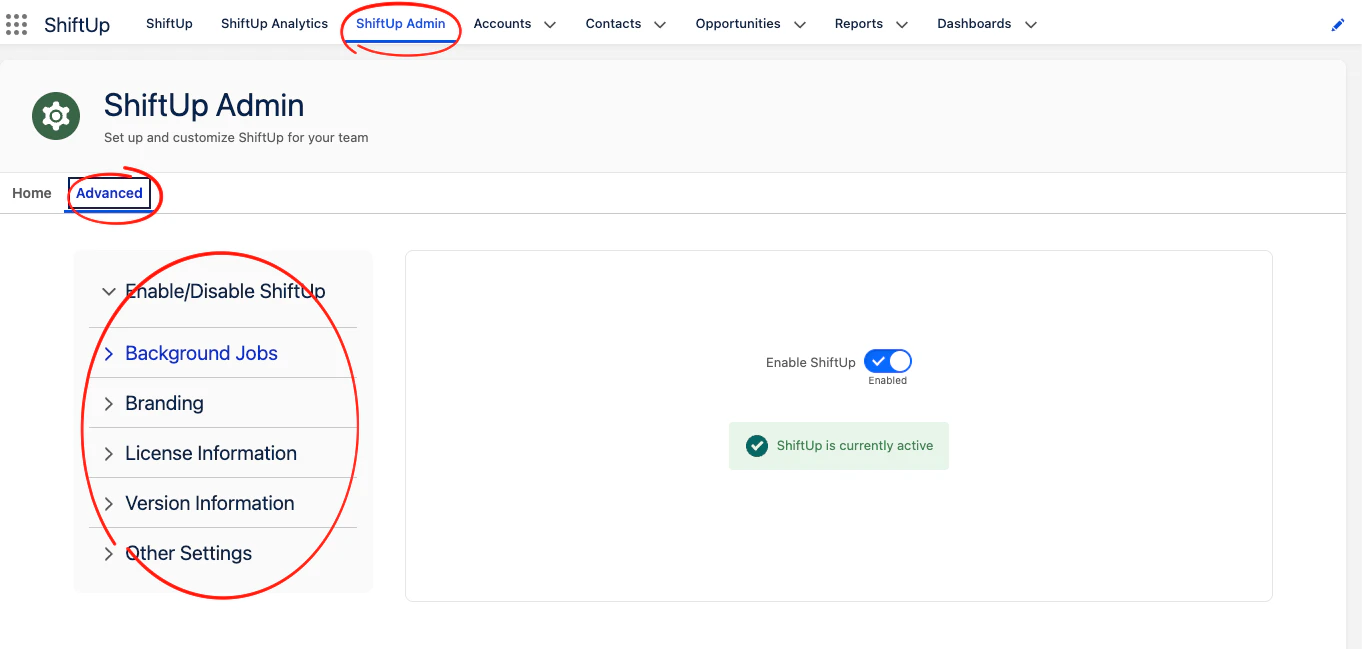
Enable/Disable ShiftUp
Master control to disable the ShiftUp user interface for all users, this is automatically enabled after ShiftUp activation.Background Jobs
ShiftUp uses scheduled jobs for recurring system operations. Review and monitor job health in Salesforce. Common job categories include:- Integration event cleanup
- Integration event retry processing
- Feature usage aggregation
- ShiftUp Feed Items Cleanup
Branding
Use the branding section to configure the company name and logo displayed in the ShiftUp sidebar.License Information
Use the license section in the admin experience to verify active licensing status and allocation details.Version Information
Use the version information section to check the current version status of your ShiftUp application. You can opt-out from receiving push upgrades from here and manually install new versions of the package.Repair Tasks
ShiftUp Admin → Advanced → Repair Tasks lists targeted maintenance and data repair jobs for your ShiftUp organization. Each task describes the operation it performs. Repair tasks are available only to ShiftUp administrators.Account Plan access reconciliation
An Account Plan looks up to a Salesforce Account, but lookup relationships do not inherit sharing. Someone can see an Account through a manual share, an Account Team, or a territory without automatically seeing its Account Plan. Two repair actions copy existing Account access onto related Account Plans:
Both actions work the same way:
- Account Read access becomes Account Plan Read. Account Edit or All becomes Account Plan Edit.
- After Plan access is established, ShiftUp adds missing Read access to the linked Seller Profile.
- Each action reads Account sharing as it exists at that moment. It never changes Account sharing. Run it again after later sharing changes.
- Rerunning is safe. Each run updates or removes only the Plan shares it created earlier and leaves other sharing rows alone. Stale Plan shares are removed; Seller Profile shares are retained.
Strategy Step Progress
The Strategy Step Progress task backfills completed Engage outreach steps into the ShiftUp Strategy Step Progress records that power the Adoption dashboard’s Engage Outreach widgets and the ShiftUp Engage Step Progress report type. Run it after upgrading so Engage activity recorded before the upgrade is counted in adoption metrics and reports. Click Backfill Engage Steps to queue the job. The task runs as an asynchronous batch job across all strategies, and a confirmation shows the job Id so you can track it under Salesforce Setup → Apex Jobs. The backfill requires Engage prospecting to be enabled for your org; when it is off, the job makes no changes. See Engage Outreach source reports for the widgets and reports this data feeds.Email Hand-off Stale Sweep
The Email Hand-off Stale Sweep task deletes Salesforce email composer hand-offs that are still unmatched to a sent email 2 hours after they were created. ShiftUp keeps any hand-off that Salesforce related an email to, because deleting it would delete that email. The sweep only cleans up. ShiftUp matches each sent email to its hand-off as soon as Salesforce stores the email, so a Sent pill or step completion never waits for a sweep. The scheduled emailHandoffReconcile job runs the same sweep. It starts disabled, and saving Use the Salesforce email composer (see Communications) enables or disables the job to match. Click Sweep Stale Email Hand-offs to run one pass. The task reports how many stale hand-offs were deleted, or reports that no stale hand-offs needed deleting. One pass deletes up to 500 hand-offs, oldest first. Run it again if you have a large backlog. Only Guided Selling admins can run this task. This feature is in Preview status.App Settings
ShiftUp Admin → Advanced → App Settings is the single place to configure how ShiftUp behaves across your organization. Settings are grouped into sections; each setting has a title, a description, and a toggle (or a picker) with an active/inactive label so you can see the current state at a glance. Use the search box at the top of the page to filter by title or description. Changes save immediately and take effect on the next page load for affected users.Account Plans & Strategies
Pipeline Agents & Workspace
Custom Research
Sharing & Access
Communications
Data & Automation
Opportunity Data
Custom filters (Beta)
The Custom filters section at the bottom of App Settings lets you expose Account fields as filters for sellers. Selections apply across the Workspace global filter bar, the Account Plans table, and the Strategies table. Only ShiftUp admins can read or change this configuration. Under Account filter fields, use the dual listbox to move fields between Available fields and Filter fields, then click Save fields. The status message shows Applying until the metadata deployment completes and confirms Account filter fields saved. If confirmation is delayed or unavailable, click Refresh fields to re-check the saved selection. Eligible Account fields. The picker lists only Account fields that are safe to filter on in Salesforce:- Text
- Text Area (standard — long and rich text areas are excluded)
- Number
- Currency
- Boolean (checkbox)
- Picklist