
Engagement roadmap (Preview)
Engage now continues past Prospecting into an engagement roadmap that guides the deal from the first meeting to close. The engagement roadmap is in preview for select customers. Orgs without the preview continue to see the conversation roadmap.- Built on your sales process — the roadmap follows your org’s Opportunity stages and any stage guidance you’ve set up, and lays out AI-recommended steps for each stage until the deal closes.
- Start at any stage — click Start roadmap on the Secured a meeting? milestone at any time. You don’t need to finish Prospecting or hold a meeting first. Link an existing Opportunity and ShiftUp starts the roadmap from the deal’s current stage. ShiftUp never changes the Opportunity’s stage.
- Work each step with ShiftUp AI — every step shows its instructions and timing, calculated from your org’s Salesforce business calendar. Conversation starters and step-specific chats help you prepare, revise the step, or record what happened.
- You approve every outcome — tell ShiftUp AI what happened, and ShiftUp proposes the outcome, the effect on the deal, and the buyer’s response for you to approve. ShiftUp only prepares the next step after you approve.
- Close as Won or Lost — record the result in chat to close the roadmap. Completed steps stay readable.
One stakeholder journey in Engage
Prospecting in Engage is now a single stakeholder timeline that leads into the roadmap.- Ordered by what’s due — every stakeholder in outreach appears as a row, with overdue work first. The header counts stakeholders in outreach, overdue touches, and touches due today. With more than five stakeholders, the timeline groups into Overdue, Due today, Upcoming, Not started, and Done.
- Inline cadences — the selected stakeholder’s row expands to show their cadence. The current touch shows its full card, upcoming touches collapse into one line, and past touches move into Past outreach.
- New add-stakeholders picker — a two-pane picker shows each stakeholder’s research, including Why recommended, Best approach, and Pain points, before you click Add to outreach.
- Per-stakeholder Generate next 3 — Generate next 3 now adds touches for the selected stakeholder only.
- Link to Salesforce before sending — if a stakeholder isn’t linked to a Contact or Lead, Send Email explains why and offers Link to Salesforce.
- Guided walkthrough — a one-time tour of Prospecting launches the first time Engage has a usable draft. Click Take a tour to replay it.
Pipeline agents
- Queue top-ups — the Runs step is now Review, set with one sentence: When I click Run or Each week, top up your pipeline to 10, 100, or 1,000 recommendations ready to review. Each run stops once the queue reaches that size. See How runs top up your queue.
- Overview card — a single overview card shows the agent’s state, how many recommendations are ready, live run progress, top-up settings, and last run details.
- Agent results — the review workspace and the Activity tab are replaced by one Agent results list. Switch between Recommendations and All results, save private filter sets, build filters in chat, and run bulk actions on the whole set or on checked rows.
- Exports — CSV, Executive Summary, and Full Data exports follow the current set. CSV exports include up to three saved stakeholders per row. See Export results.
- Larger uploads — uploaded lists can now be up to 100 MB.
- Strategy approvals follow Workspace filters — the Workspace Strategy approvals widget now applies the selected global filter’s account owner and industry criteria. See Strategy approvals and global filters.
Seller Profile Files
You can now attach reference material, such as price books, case studies, playbooks, and sales decks, to a Seller Profile. ShiftUp agents use these files as reference material. That includes pipeline agents, chat, and the agents that build account plans and strategies. Files is on by default for every org.- Add files at creation or later — attach up to 50 files on the Files card of the create form, and ShiftUp uses them when it generates the profile. You can add more later from the profile’s Files tab.
- Broad file support — PDF, Word, PowerPoint, text, Markdown, CSV, Excel, JPG, and PNG, up to 100 MB per file.
- Agent access status — the Agent access column on the Files tab shows whether each file is Available to Agents, Syncing, Not Synced, or an Unsupported File.
- Sync files — click Sync files to pick up files added or removed outside the Files tab, such as directly in Salesforce.
Account Emails context provider
A new opt-in Account Emails CRM Context provider shares SalesforceEmailMessage records, including subject, participants, and message body, with ShiftUp. While it’s enabled, ShiftUp excludes email Tasks from the Account Tasks provider so the same email isn’t shared twice.Realistic previews for Custom Research
Admins and managers can now run a saved Custom Research component against the real data of an Account Plan or opportunity Strategy before rolling it out. Click Generate preview in the Preview column on the Components page. Previews run in the background and are stored on the component. See Realistic previews.Chat for Read Only users
Users with the Read Only and Read Only View All personas can now open Chat to ask questions about records they can access. Chat doesn’t offer them edit actions or approvals. See Who can use Chat.Strategy assignment notifications
When someone else creates a Strategy assigned to you or reassigns one to you, you receive a Strategy assigned to you bell notification. Admins can turn these off with Disable Push Notifications. See Notifications and feed.Meetings
The meetings calendar view is now Bot schedule. It shows meetings eligible for bot recording, labels each event Bot will join or Bot won’t join, and includes a calendar connection status control with Disconnect. Create Meeting is now Record meeting, with Send bot and Add transcript options. See Calendar integration.Communication style
You can now save communication style changes without clicking Update preview first. An Unsaved changes badge shows when you have edits to save. See Communication style.Reports and dashboards
- Engage status widget — the Engage Outreach section of the Adoption dashboard has a new Engage status widget that groups active strategies into No activity, Prospecting, and Engaged. It appears for every org.
- Standard Dashboard tab removed — ShiftUp Analytics now has two tabs, Pipeline and Adoption.
Pipeline agents
Pipeline agents have been substantially overhauled. See Pipeline agents for the full walkthrough. If your org has not upgraded to this release yet, Pipeline agents (legacy) documents the earlier experience.- New creation wizard — creation now uses Focus, Plan, Sources, and Runs. Focus captures the starting idea and whether the agent should look for New, Existing, or Any customers. Plan is a ShiftUp-authored agent name, focus text, priority areas, and custom filters that you refine in natural language. Sources exposes independent checkboxes for Monitored accounts, Salesforce selection, Uploaded lists (CSV or XLSX), and Market discovery. Runs offers Standard, Expanded, Extensive, or Custom with independent controls for the recommendation target, company research limit, minimum quality grade, and review queue threshold. New agents no longer set a revenue goal.
- Company-centered review workspace — Overview and Activity share one table that groups by Company, Status, Account owner, Industry, Run, or None. Filter menus hide parents and choices without matches and show a matching-row count for each visible parent, respecting search and other filters.
- Quality grades A+ / A / B / C — candidate quality is presented as A+ (85%+), A (70–84%), B (50–69%), or C (below 50%). The underlying scores and thresholds are unchanged; API grade bands remain A/B/C/D so saved selections and integrations keep working.
- New decision brief — one shared surface for pending review, discovery history, and the original-candidate dialog. Overview pairs company facts with the complete suggested approach, timing, and people. A persistent contents menu opens Overview, Estimate & timing, Signals, Research & quality, and each saved person directly. Export PDF produces the full brief.
- Older agents load safely — agents whose saved configuration is missing a target mix load with Any customer focus; missing descriptions stay blank rather than blocking the list or detail view.
- List assistant for uploads — uploaded lists are cleaned by a list assistant that shows live progress and time left, previews the cleaned list with Download CSV, and lets you refine it in chat. You can change the Company, Website, and Site column roles and set Account matching. Saved lists reopen with their chat. See Clean an uploaded list with the list assistant.
- Simpler Sources step — sources are checkable tiles whose setup cards collapse to a summary with Change. A What this agent researches summary and one shared, optional Companies to skip section cover every source.
- Scoped sites and Account matching — each site, division, or region is a separate research target with explicit Account and parent matching. The activation dialog names the parent account it sets, activation shows Account Plan progress, and Account Plans link to parent and child plans within the same Seller Profile. See Scoped sites and Account matching.
- Advanced re-evaluation — Settings → Advanced re-evaluates the saved backlog, skipping cooldowns, refreshing recommendations and activated strategies, and retrying rejected candidates. See Re-evaluate the saved backlog.
- Strategy-owned quality grades — activated strategies own their grade, the pipeline Active row and strategy page show the same assessment, and every grade opens a breakdown popover. See Grades on activated strategies.
- Legacy strength display — when Enable Pipeline Agents is disabled, strategy lists, detail pages, and PDFs fall back to the released numeric Confidence percentage and the legacy strategy strength display.
Salesforce standard email composer (Preview)
An admin can now route every ShiftUp email entry point — stakeholder Actions, cadence email steps, and Engage touchpoints — through Salesforce’s standard email composer instead of ShiftUp’s. Turn it on with Use the Salesforce email composer in Communications settings. The Salesforce composer opens prefilled with the linked Contact as the recipient, any CC recipients, and the draft subject and body; Salesforce adds the user’s email signature and sends the email.For Contact recipients, ShiftUp records a hand-off and reconciles it against the email Salesforce stored. A Sent pill appears on the cadence email step or Engage touchpoint the next time the view loads, and the originating cadence email step is closed automatically. Reconciliation runs periodically as the emailHandoffReconcile background job, and admins can force a sweep from ShiftUp Admin → Advanced → Repair Tasks → Email Hand-off Stale Sweep. Lead recipients are handed off without tracking — Salesforce does not allow relating a Lead email to a strategy — and the user closes those steps with Manual Complete.This setting does not require Enhanced Email or Sales Engagement. See Generate an email and Cadence emails.CC recipients on email sends
ShiftUp email sends now support a CC field on the stakeholder side panel’s Actions and Cadence email composers. Search across active Users, Contacts, and Leads (matches appear as each source answers), or type a full email address to add someone who isn’t in Salesforce. Duplicates and the To recipient are rejected, and you can add up to 20 copied recipients per email. Copied recipients belong to a single draft — regenerating, switching stakeholders, or changing the draft clears the list.See Generate an email and Cadence emails.Strategy updates from chat
You can now update a strategy directly from Chat. Add a stakeholder, revise the business case, or record MEDDPICC changes by describing the change in plain words — or use the new Add Stakeholder, Update business case, and Update MEDDPICC buttons on the strategy’s tabs to start the request from a short form. ShiftUp drafts the exact edit and presents it as a review card in Chat, with a Show diff toggle to see precisely what changes. Nothing is written to Salesforce until you click Apply change.See Updating strategies from chat for the full walkthrough.Reports and dashboards
The Adoption dashboard in ShiftUp Analytics has a new Engage Outreach section that shows how your teams are using ShiftUp Engage. Six widgets track completed outreach cadence steps: strategies with and without outreach activity, completed steps by channel, top users by completed steps, top users by strategies with no outreach activity, and top accounts by completed steps. Each widget is backed by a packaged Salesforce report, and two custom report types are available for building your own Engage adoption reports. See Engage Outreach source reports.The widgets count Engage steps completed after your org upgrades to this release. To include earlier Engage activity, run the new Strategy Step Progress repair task under ShiftUp Admin → Advanced → Repair Tasks.Context providers
- Contains and Does not contain filters — CRM Context provider field filters have two new operators for text, text area, and single-select picklist fields. Matching is case-insensitive, and Does not contain also includes records whose field is empty. The operator dropdown only shows operators the selected field supports and resets to Equals when a field change makes the current choice invalid. See Field filters.
Click-to-dial from stakeholder phone numbers
Every phone number ShiftUp shows for a stakeholder is now a click-to-dial entry point. Click a number on the stakeholder sheet Overview row, on an Engage roster card, or on an Engage cadence phone draft to open the Salesforce Call preview with the number and the linked Contact or Lead. The preview hosts the native Salesforce phone control, so sellers dial through their connected telephony provider without leaving ShiftUp. If the stakeholder is not linked to a Contact or Lead, the preview still opens but cannot attribute the call to a record — convert the stakeholder first if you want the call logged. Dialing requires a telephony solution enabled in your Salesforce org (an Open CTI softphone or Sales Dialer with click-to-dial enabled); without one, the number renders as plain text. See Call a stakeholder from a phone number.Workspace
- Prospecting queue scope and sorting — the Prospecting queue widget and its drill-in now follow the workspace’s global Ownership and assignment filters, and both share a full sort menu: Recommended (the default due-priority order), Most recent, Account name, Strategy name, Value, and Confidence.
- Prospecting-led rep layout — reps’ default workspace now leads with the Prospecting queue: row 1 is Prospecting queue, Active strategies (hero), and Priority accounts; row 2 is ShiftUp coverage (hero) and Daily feed. Saved layouts aren’t migrated — click Reset to default to pick up the new arrangement.
- How ranking works — the Workspace page now explains how ShiftUp ranks your accounts: the three lenses, the signals behind a rank, and how fresh the ranking is. There’s also a new Customize your workspace how-to guide.
Pipeline dashboard
- Per-card filters — the Active pipeline value and Total pipeline in ShiftUp accounts metric cards now expose filter popovers, including an exclude-closed-won toggle, an opportunity-created timeframe, and an only-after-account-linking toggle. See Pipeline dashboard for the full walkthrough.
Engage
- Send Email without converting first — Send Email now works on stakeholders that aren’t yet linked to a Salesforce Contact or Lead. ShiftUp links the stakeholder in the background while the button shows Preparing email…, then opens the review dialog with the created or linked record as the recipient.
- Log calls and LinkedIn messages as Salesforce Tasks — when the Log ShiftUp non-email activities setting is enabled, call and LinkedIn steps you mark complete in Engage (and in cadences) are logged as completed Salesforce Tasks on the contact or lead. The setting is off by default. See Communications settings.
Stakeholders
- Request Phone Number (Add-on) — ask ShiftUp to look up a phone number for a converted stakeholder from the side panel’s Actions tab. The lookup runs in the background and presents a picker when multiple numbers are found. See Request a stakeholder’s phone number.
- Phone-mismatch warning — when a stakeholder profile’s phone number differs from the linked Salesforce Contact’s, a warning icon appears next to the number with a tooltip explaining which number is shown.
Chat
- Artifacts and exports — ask Chat to build slide decks and one-pager PDFs from your account and strategy data, review them right in the conversation, and export decks as
.pptxand one-pagers as PDF. Decks include full speaker notes, Chat adds charts and infographics where the data supports them, and every asset carries your company branding. See Artifacts and exports.
Pipeline agents
- Account owner in the pending queue — the pending candidates table now shows an Account owner column with a matching facet filter, owner-name search and sort, and a right-click Filter by Account owner action.
- Assignment on activation — the reworked activation dialog assigns each strategy to its account’s Salesforce owner by default (resolved live at activation), with fallbacks, an “everything to one user” option, and an admin-gated opt-in to also transfer account ownership. See Assignment on activation.
Feed
- Create as Task — turn a feed item’s Suggested action into a Salesforce Task without leaving the feed. Set the title, description, due date, and related Account or Opportunity; the card keeps a private View task link back to the Task. See Create as Task.
Account plans
- Bulk import from custom criteria — the Bulk Import wizard on a Seller Profile can now build an import from custom filter criteria (up to 5 filters) as an alternative to a Salesforce Report, with a 10,000-row cap for criteria runs. See Bulk Import.
Branding
- Presentation deck branding — set the brand and accent colors for the slide decks Chat generates, and choose whether your logo appears on the title slide only or on every slide. See Presentation deck branding.
- Meeting assistant branding — brand the ShiftUp assistant that joins your customer meetings: set the display name shown in the participant list and upload the image used on the meeting tile. See Meeting assistant branding.
Admin and setup
- Read Only persona — a new persona with read-only access to account plans and strategies; it cannot create, edit, share, refresh, or create tasks, and stacks with the Pipeline Agent Viewer permission set.
- Clearer App Settings — seven App Settings were renamed so each toggle’s label names its outcome (for example, Disable ShiftUp AI Chat and Bypass Activation Prompt), with defaults and descriptions updated to match. See App Settings.
- Admin-only custom research associations — a new ShiftUp Admin setting restricts custom research seller-profile associations to admins with Modify All on Seller Profile. See Set up custom research.
Compliance and reliability
- SOC 2 certification — ShiftUp is now SOC 2 certified. Compliance documentation is available on the ShiftUp Trust Portal.
- Status portal — check whether ShiftUp services are online at the ShiftUp Status Portal.
Pipeline agents
Pipeline agents are now available — always-on, AI-driven discovery jobs that scan your market, evaluates the accounts looking for high-quality targets, and surfaces them for review. Accepting a candidate creates a full Sales Strategy in ShiftUp.See Pipeline agents for the full walkthrough.Engage tab (preview)
A new Engage tab is available on Sales Strategies and takes the place of Conversation Roadmap. Engage combines a new stakeholder-aware prospecting cadence — with AI-drafted emails, calls, and social touches — with the classic Conversation roadmap in a single workspace.See Engage tab for the full walkthrough.Workspace (preview)
The workspace is your daily command center in ShiftUp by surfacing the accounts, strategies, approvals, and activity across your book of business that need your attention today.See Workspace for the full walkthrough.Custom Research is now generally available
Custom Components has been renamed Custom Research and is now enabled for all customers. Admins and managers can now build their own AI-researched content blocks that render inside Account Plans and Strategies. See Custom Research for the full walkthrough. There is a limit of 5 per customer.Personal Customization
A new Customize entry in the left sidebar gathers your personal preferences in one place. Set the tone, length, impact, greeting, and next-step defaults ShiftUp uses when drafting outreach, plus habits to avoid. These preferences will be used on any ShiftUp generated email. You can also change the appearance of ShiftUp from light mode to dark mode.See Customize for the full walkthrough.Stakeholder viewpoints
Stakeholder cards now surface viewpoints — the stakeholder’s likely position, concerns, and priorities — that have been made available via social media posts, the press, quarterly or annual reports, or other publicly available sources. This is a new tab on the stakeholder window.ShiftUp Mobile
A ShiftUp mobile experience is now available within the Salesforce mobile app. Highlights include:- Voice notes on account plans — Capture account notes hands-free.
- Dashboard widgets on mobile — The core dashboard widgets render on mobile.
- Reliable tab boot routing — Tabs restore to the last screen you were on.
Strategies
- Request strategy — Ask ShiftUp to draft a new Sales Strategy on demand from an Account Plan’s Strategies tab. Once account intelligence is ready, click Request strategy and reply in Chat to pick one of the two suggested directions or supply your own — ShiftUp drafts the full strategy grounded in the plan’s intelligence. See Request a strategy.
- Bulk archive (New + Active) — The bulk archive action now appears for users with edit access. Multi-select strategies and archive them in one action; the Archived tab remains excluded.
- Bulk assign user (New + Active) — Multi-select strategies on both the New and Active tabs and reassign them to another user in one step. The assign dialog searches by name or email (2+ characters) and assigns them in one action; the Archived tab remains excluded.
- The Value column and value sort are now available on the Archived strategies tab (matching the Active and New tabs).
Account plans
- Bulk-assign owner — Reassign the owner on multiple account plans from a multi-select on the account plan list, similar to strategies.
- Activity indicator moved — The activity indicator has moved off the company logo to a sticky-note icon pinned to the right of the plan name; long plan names now truncate cleanly. Hover over the icon in the list view to see note and meeting notetaker counts. Both refresh as notes and meeting links change.
Account ownership change handling
When a Salesforce Account owner changes, ShiftUp now reconciles Account Plan access based on your Account Plan Owner Sync setting — reassigning plans when sync is on, or restoring the required Account shares for existing owners, assignees, and recipients when sync is off. See Account ownership changes.Support for Private Account OWD
ShiftUp now formally supports Salesforce orgs that use a Private Account sharing model. Configure Account Plans as Private to match, and ShiftUp will coordinate the required Account read-shares through Salesforce’s standard security model whenever plans are created, reassigned, or shared. Account Plan sharing continues to govern access to the plan’s strategies and feed.See Working with Private Account OWD for the full walkthrough.New admin control: Disable Account Access Sharing
Admins can now toggle Disable Account Access Sharing to temporarily pause ShiftUp’s automatic creation and restoration of Account shares if unexpected sharing behavior is observed. While enabled, plan sharing continues, but admins are responsible for ensuring plan owners, assignees, and recipients retain the Account access they need. Intended as a temporary safety measure during investigation.Account ownership change handling
When a Salesforce Account owner changes, ShiftUp now reconciles Account Plan access based on your Account Plan Owner Sync setting — reassigning plans when sync is on, or restoring the required Account shares for existing owners, assignees, and recipients when sync is off. See Account ownership changes.Bulk import (Admin)
Bulk import lets admins create Account Plans in bulk for a Seller Profile from a Salesforce Report of Accounts, instead of adding accounts one at a time. Open the Monitored Accounts tab on a Seller Profile, launch the Bulk Import wizard, pick a Salesforce Report, and ShiftUp validates the source, previews the accounts that will be brought in, kicks off the run, and tracks it as an Import Job you can watch to completion (with an Abort action for anything still running).- Read-only Import Jobs for non-admins — Team members can open the Import Jobs page on a Seller Profile and review job history, status, and failures without needing admin rights. Starting new imports and aborting active runs still require the Bulk Import Account Plans permission.
Dashboards
- Multi-user filter — The user filter on the Pipeline and Adoption dashboards now supports multi-select.
- Total pipeline in ShiftUp accounts — Closed opportunities are now excluded from the “Total pipeline in ShiftUp accounts” metric.
List view filters
- Multi-user Owner and Assignee filters — The Owner filter on account plans and the Assignee filter on strategies now match up to 20 users at once, (previously one user at a time).
Jun 5 Update
Custom Components
Admins and managers can now build their own AI-researched content blocks that render inside Account Plans and Strategies. Define research, intent, and schema in a guided two-pane editor; ShiftUp generates the output as Cards, a Table, or an Insight view. Visibility rules — advanced filters, record overrides, and seller-profile associations — control exactly which records each component shows. See Custom ComponentsComponents for the full walkthrough.Strategies
- Rename strategies — Edit a strategy’s name directly from the strategy overview using the pencil icon.
- Related open opportunities — The strategy overview now surfaces open opportunities on the related account so you can see what else is in flight.
- Auto-archive on close — Strategies are automatically archived when their linked opportunity is closed; archival reasons have been relabeled for clarity.
- Account strategy selector — From an opportunity record, users can select a ShiftUp strategy to link to the opportunity using the ShiftUp tab. Users can also view all strategies for that account from the ShiftUp tab.
- Value column on Active tab — The strategy Value column with sort are now available on the Active strategies tab.
Feed Updates Now Generally Available
Never miss a critical update. ShiftUp now includes a notification and feed system, so Account Plan and Strategy changes are always visible and traceable. Updates include:- Default to unread — The Feed now defaults to unread items, so you start with what needs attention.
- Notification content details — Feed cards now include the impact and suggested action — so you can act immediately on any updates.
Journey Updates
- MEDDPICC scorecard and add-note tours — New guided tours walk sellers through completing the MEDDPICC scorecard and adding account notes.
- Deal Progression phase visible to all — The Deal Progression phase on the Your ShiftUp Journey timeline is now visible to every user.
Integration user setup — New Integration License option
The post-install wizard now offers a new recommended path for provisioning the ShiftUp integration user: Create with Integration License. This uses a Salesforce Integration user license plus the Salesforce API Integration permission set license, so the integration user does not consume a paid Salesforce user license. The wizard reports remaining license counts inline and falls back to Create with Standard License or Select Existing User when the integration license isn’t available. See the updated integration setup steps.Branded PDF exports
Admins can now brand the PDFs ShiftUp generates with their own company name and logo. Configure your logo URL and enable Include logo in PDF exports under ShiftUp Admin → Application Setup → Branding, and every Account Plan, Strategy, business case, and Seller Profile PDF will use your logo in the footer. See Branding.May 15 Update
Journey landing page
A new Journey page is now the home view when you open ShiftUp. It gives sellers an at-a-glance overview of assigned work and onboarding progress in one place.Real-time update notifications and feed (beta)
Never miss a critical update. ShiftUp now includes a notifications and feed system, so Account Plan and Strategy changes are always visible and traceable.NOTE: You may see the “feed” feature on your menu with an empty feed while we prepare for general availability.New Activity tab on Sales Strategies
A new Activity tab on Sales Strategies provides a centralized view of all engagement related to a strategy.Context Console (Admin)
A new Context Console is available under ShiftUp Admin. Admins can now run any enabled CRM context provider against a specific account plan and inspect the exact JSON it returns — making it easy to validate configurations, troubleshoot missing context, and confirm integration-user permissions before data flows into account plans and strategies. Available to users with the ShiftUp admin permission and View All Data when CRM Context is enabled.Experience Enhancements
- The adoption dashboard now includes new widgets to indicate onboarding progress from the Journey page.
- The email composer window on the Stakeholder Actions tab now allows resizing or full-screen mode.
- Account and Strategy list views will now include the number of records displayed and the total number of records.
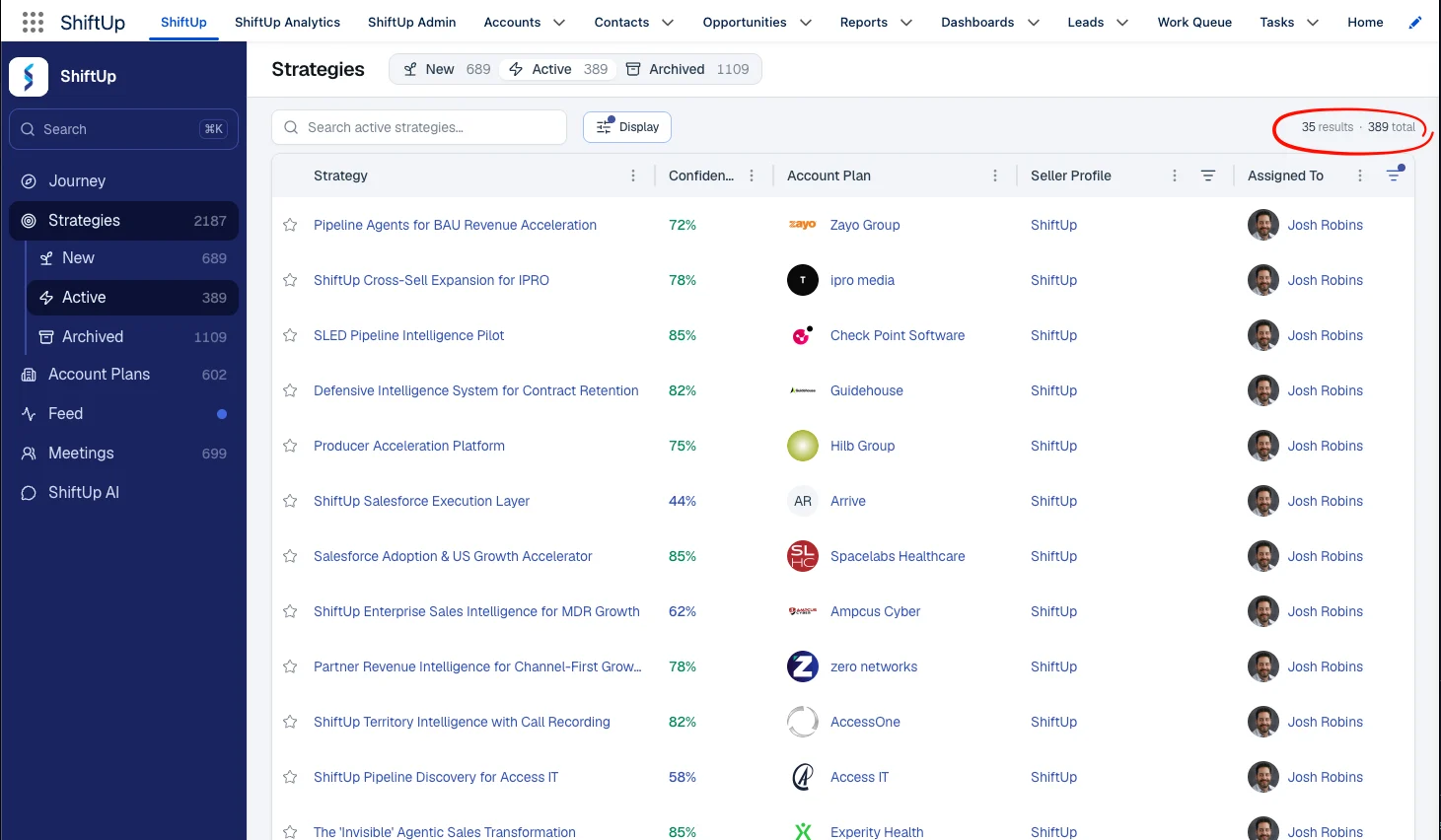
- Account and Strategy list views now include an Unviewed assigned to me filter, so you can jump straight to records that are assigned to you and haven’t been opened yet.
Apr 26 Update
Cross-sell strategies are now generally available
Cross-sell strategies are now generally available to all customers. ShiftUp automatically identifies opportunities to expand revenue within accounts you already serve and generates a tailored strategy — including hypotheses, pain points, stakeholders, and a business case — framed around growing the existing relationship. Implement Context Provider to better inform ShiftUp of existing customers.Context Providers is now generally available
Context Providers is now generally available. Connect ShiftUp to additional CRM data sources — such as won opportunities and account details from Salesforce — to produce more accurate account plans and sales strategies.Chat (Preview)
ShiftUp Chat is a conversational AI assistant built into the platform. You can ask questions about your accounts, strategies, stakeholders, and deal context and get instant, sourced answers without leaving Salesforce.Chat (Preview) trusted URLs for existing customers — Customers upgrading to a package version that includes Chat now have a guided setup for adding the required trusted URLs to their Salesforce org. New installations include these URLs automatically. See Enable chat for existing customers.Mar 26 Release
Meetings (Beta)
A new Meetings feature was added to the menu of ShiftUp. A notetaker sends an AI bot to your meetings to record, transcribe, and extract insights. Transcripts, participants, and AI-generated insights are stored as Salesforce records and linked to your Salesforce accounts, opportunities, and contacts. Additionally, the insights from the meeting inform the ShiftUp Account Plan and Strategies, which may result in an updated or new strategy. Learn how to Use Shiftup Meetings.New activity tab on strategies
Strategies now include a dedicated Activity tab, giving you a centralized view of all actions and events related to a strategy. This tab includes all ShiftUp meetings, and all events and tasks from the related Salesforce Contact, Account, and Opportunity records. Track all engagement in one place without switching between tabs. Learn more about the Activity Tab.Confidence score history (Beta)
A new History tab in the Shiftup Strategy tracks changes in Confidence Score over time. Monitor how strategy health evolves with a visual timeline of score updates, helping you identify actions and insights that increase the Strategy’s viability. Learn more about Confidence Score History.Add accounts to ShiftUp from the Salesforce Account record
You can now add accounts to ShiftUp directly from the Salesforce Account object. When viewing an Account record in Salesforce, the ShiftUp tab now lets you add this account to your monitored ShiftUp accounts.Improved adoption dashboard
The Adoption Dashboard in ShiftUp Analytics has been enhanced with clearer visualizations and more actionable metrics, making it easier to measure and drive platform usage across your organization.Email signatures on AI-generated emails
AI-generated emails now automatically include your email signature found in your Salesforce profile, ensuring every outbound message maintains a professional, consistent appearance without manual editing.Persistent view filters
Filters applied to Account and Strategy list views are now persistent across sessions. Your preferred sorting, filtering, and display settings are saved so you can pick up exactly where you left off.Feb 26 Release
Real-time update notifications and feed (Beta)
Never miss a critical update. ShiftUp now includes a notification and feed system, so Account Plan and Strategy changes are always visible and traceable.- Master feed — Accessible from the left-hand menu, this view shows all updates across all Account Plans and Strategies in your organization.
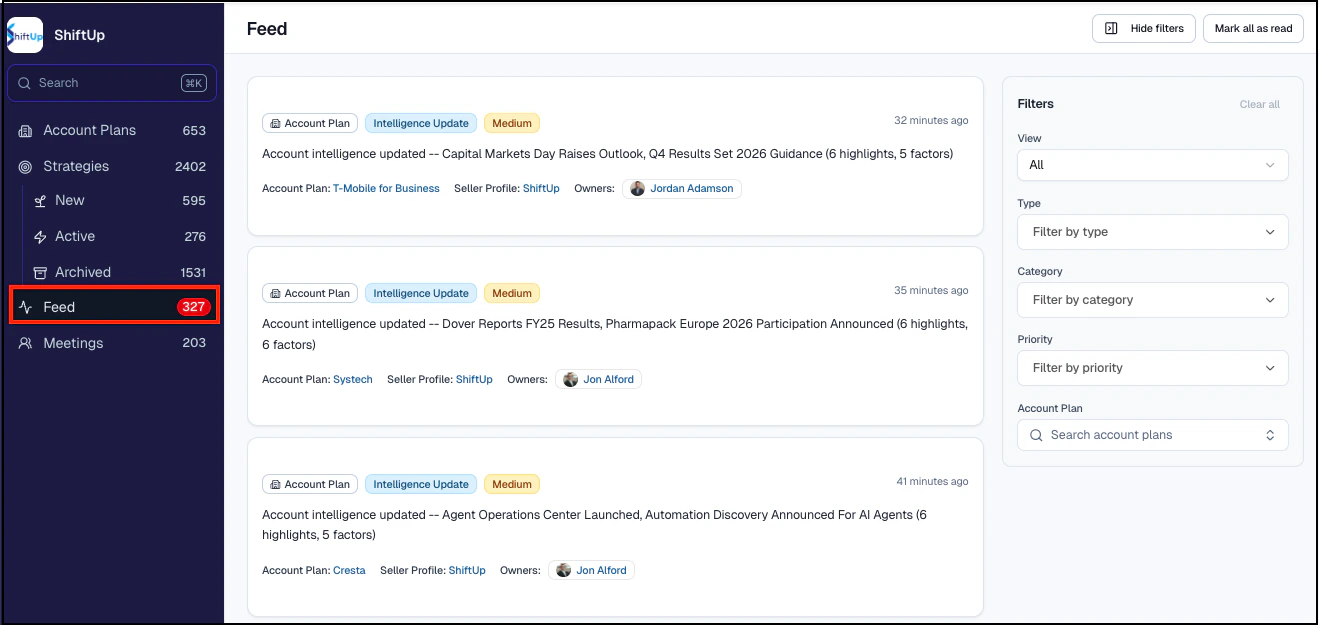
- Salesforce bell notifications — Account Plan and Strategy owners receive alerts with a summary of what changed and a direct link to the updated record.
- Record feed — A new tab within each Account Plan or Strategy shows that record’s full update history.
- Master feed — Accessible from the left-hand menu, this view shows all updates across every Account Plan and Strategy in your organization.
- Filtering and search — Filter by type (Account Plan or Strategy updates), update category (Intelligence or Strategy), priority (High, Medium, Low), or search for a specific Account Plan.
Mass archive strategies
You can now archive multiple strategies from the new strategies tab:- Click Select at the top of your strategy display.
- Check the boxes for the strategies you want to archive.
- Click Archive and confirm your selection.
ShiftUp adoption dashboards
New dashboards in the ShiftUp Analytics module provide real-time visibility into how your organization is using ShiftUp. Navigate to ShiftUp Analytics and click the Adoption tab to see:- Plan and strategy velocity — Status and volume of your account plans and strategies, to determine which are being viewed and by whom.
- AI efficiency — Total number of AI-generated emails and call scripts, quantifying time savings.
- Stakeholder conversions — How effectively your team is converting key stakeholders.
- Favorites and high-value targets — Volume of Account Plans and Strategies being favorited across the company.
Email and call enhancements
- Stand-alone call scripts — Generate call scripts outside of Cadences.
- Log calls directly — Use “Log Call Notes” to record calls into Salesforce without switching screens.
- Strategy activation prompt — A new prompt reminds users to activate strategies when generating emails or call scripts. This can be turned off in Admin settings.
- Salesforce email signatures — ShiftUp-generated emails now include your Salesforce email signature from Settings > Email > My Email Settings.
- Generate emails without an email address — Content is generated even when no email address is present, allowing you to obtain the address before sending.
Jan 26 Release
Sales engagement
ShiftUp can generate personalized email and call scripts aligned to your sales strategy. Choose to generate a stand-alone email or use Salesforce Cadences (requires Sales Engagement in Sales Cloud).To get started, click on a stakeholder within a Sales Strategy and use the Actions or Cadence tabs on the side panel.- Stand-alone emails — Click “Generate Email Message” to create a draft you can tailor, copy, or send directly from ShiftUp. Sending records the activity on the contact or lead record.
- Cadence integration — Add stakeholders to cadences (they must be converted to a lead or contact first), then generate email or call scripts for each cadence step using “Generate with AI.”
- Context-aware content — Emails may reference previous calls by checking activity history on the contact or lead record.
Account plan updates
- Account plan notes — Add context and insights that may not be available from external sources. Notes can now be entered before generating the initial plan through the Seller Profile “Manage Account” function.
- On-demand refresh — Request an immediate Account Plan refresh via the ellipsis menu. The default refresh is weekly (or daily for active accounts if configured by your admin).
- Automated owner synchronization — Automatically sync Salesforce Account Owners with ShiftUp Account Plans and Strategies. Enable this in ShiftUp Admin > Other Settings.
Account plan and strategy list view improvements
Several improvements to drive efficiency with customizable displays:- Display filter — New filter button for sorting, filtering (favorites, owned by me, assigned to me, unmonitored accounts), choosing display columns, and pinning the name column.
- Column sorting and filtering — Sort via the ellipsis on column headers; filter via the filter icon.
- Resizable columns — Drag separator bars to resize columns.
- Contextual shortcuts — Right-click on any row for quick actions like copying links, viewing details, or reassigning.
AI sources cited
ShiftUp now shows the comprehensive list of sources used to develop each Account Plan and Strategy. Find the list in the Sources tab, and see inline citations via the info icon within the text.Admin updates
- Push upgrades — ShiftUp now delivers automatic upgrades to the Salesforce Managed Application. View your version in ShiftUp Admin > Advanced Settings > Version Information. Push upgrades can be disabled if needed.
- Refresh frequency restriction — Restrict account plan refresh frequency controls to administrators only via ShiftUp Admin > Advanced Settings.
Dec 25 Release
Smarter, more concise AI-powered seller profiles
The AI Seller Profile Generator now produces more concise, relevant profiles, cutting the fluff and surfacing targeted guidance. We encourage users to offer insights that are not available on public forums, such as whether to include or exclude specific products and internal selling guidance.Expanded seller permissions
A new “Restricted Seller” permission prevents specific sellers from adding accounts to a Seller Profile while keeping other seller capabilities intact.To activate, go to the ShiftUp Admin console and navigate to ShiftUp Personas Management. Assign “Restricted Seller” to the appropriate users. Existing users with the “Seller” permission will continue to be able to add accounts.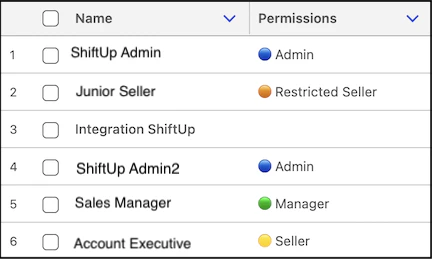
MEDDPICC support
ShiftUp now generates an evidence-based MEDDPICC report that evaluates strategy health by analyzing key MEDDPICC components and providing supporting evidence. The report is available as a PDF and includes a summary of strengths, weaknesses, detailed evidence, gaps, and prescriptive next steps.To view the report, open a Strategy and select the MEDDPICC tab.Account plan notes
Sellers can add notes to Account Plans to include context not available from external sources, such as internal project details or meeting notes. Adding a note refreshes the Account Plan and may introduce new strategies.To add a note, navigate to the Account Plan, select the Notes tab, and click Add Note.Link strategies to existing opportunities
You can now link strategies to existing Salesforce opportunities, in addition to converting strategies to new opportunities. This linkage is reflected in ShiftUp analytics.- When activating - Click “Activate Strategy” and choose “Link to Existing Opportunity.”
- On active strategies — Use “Link to Opportunity” in the upper right of the strategy overview.
- To remove — Use the kebab menu and select “Unlink Opportunity.”
Favorite strategies
Mark Account Plans and Strategies as favorites with the star icon at the top of the screen or in the list view. You can also filter list views to display only favorites. Use this to prioritize your most important plans and strategies.Lead and contact creation improvements
Converting stakeholders to Salesforce contacts or leads now includes the job title, and the lead source is set to “ShiftUp” for better tracking.Include all strategies in the account plan download
Account Plan PDF downloads now include associated strategies. Strategy-level PDFs also support downloading all sections or specific sections, like the Business Case. Use the kebab menu from the Account Plan or Strategy to perform this action.Nov 25 Release
Stakeholder email discovery enhancements
Stakeholder profiles now automatically include verified email addresses, making it faster to identify the right contacts and initiate outreach. Enriched profiles combine role, influence level, and contact information into a single view.Stakeholder to contact/lead conversion
Convert stakeholders directly into new Contacts or Leads, or match them to existing CRM records.Account plan refreshes
Account Plans now refresh automatically weekly, ensuring you always have the most current account intelligence. You can always request a refresh on demand.AI assisted seller profile generation
Let ShiftUp suggest the company profile and the ideal customer profile based on our AI research. You can enrich what’s been generated to steer research focus on specific areas.To use this feature, create or open a seller profile and click Generate with ShiftUp Intelligence, then reload the seller profile to review the generated content.Seller profile PDF export
Export any seller profile as a formatted PDF for sharing, reporting, or record-keeping. Use the kebab menu from the Seller Profile to perform this action.Improved search experience
Search now surfaces related opportunity strategies when you look up an account, giving you deeper context from a single search.Sync the account plan and account owners
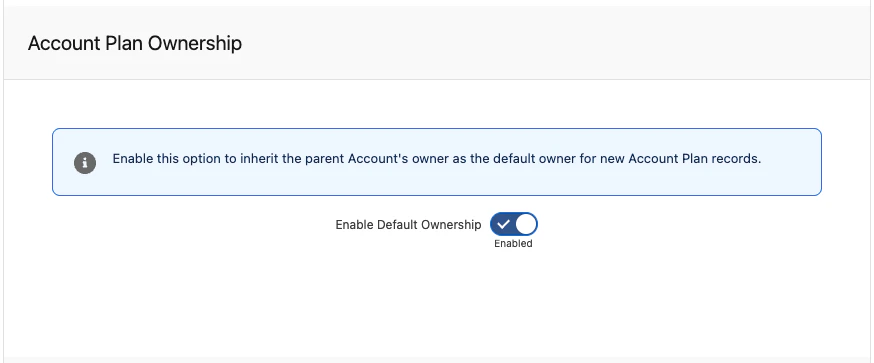
Automatic syncing between Account Owners and Account Plan Owners ensures consistent ownership. When enabled, new Account Plans inherit the parent Account’s owner. To enable this, navigate to ShiftUp Admin > Other Settings > Account Plan Ownership.