

Overview
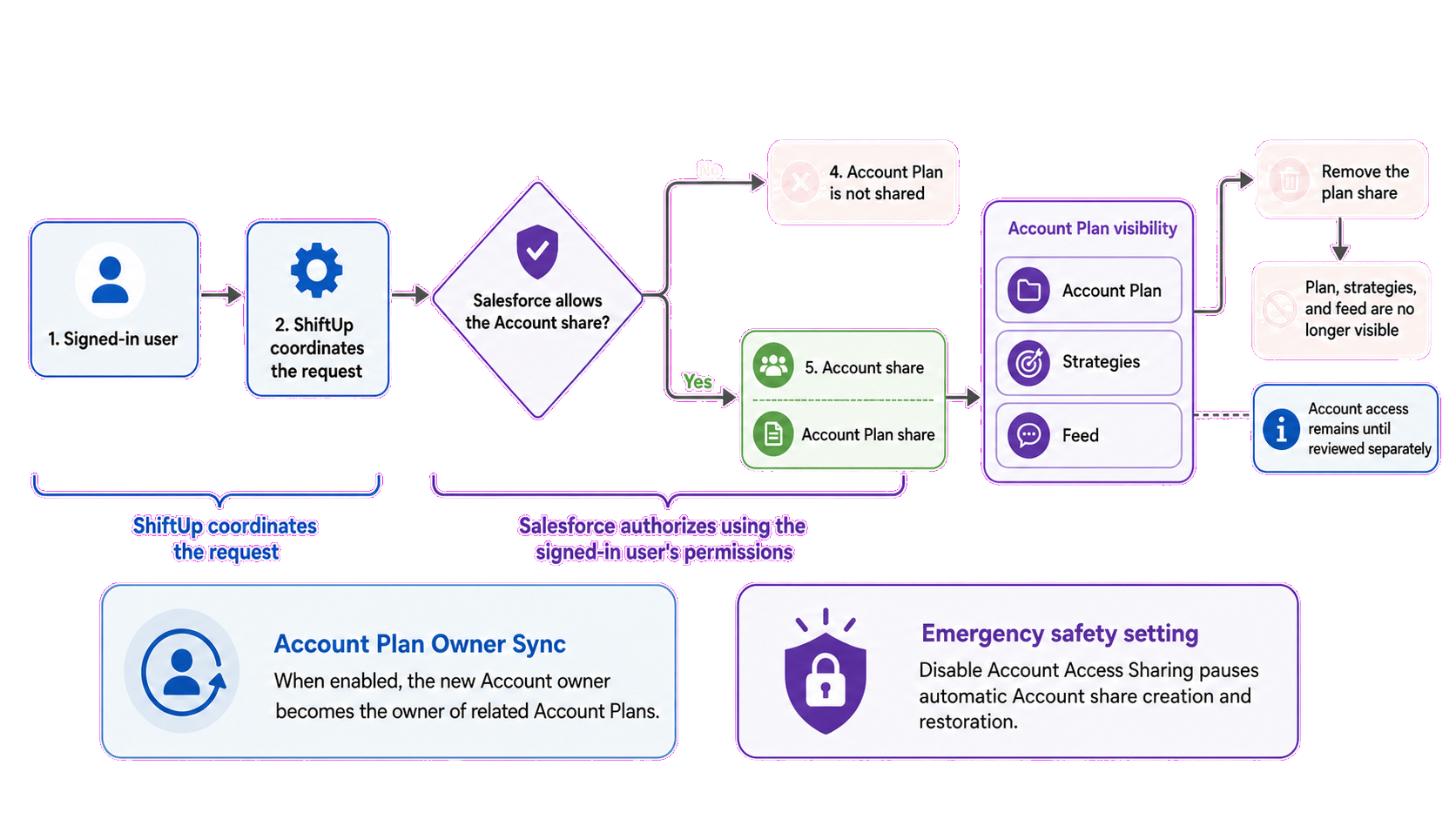
When a Salesforce organization uses Private Account sharing, its Account Plan sharing model should also be Private. This prevents users from viewing an Account Plan without access to its related Account.Recommended configuration: If Accounts are Private, configure Account Plans as Private too.Account Plan visibility also controls access to the plan’s strategies and feed. These are not shared independently: users who can access the Account Plan can access its associated strategies and feed, subject to their Salesforce permissions. ShiftUp works within Salesforce’s standard security model. It uses the signed-in user’s permissions, and Salesforce determines whether each sharing action is allowed.
Administrative safety control
ShiftUp includes a Disable Account Access Sharing setting. An administrator can enable it to temporarily stop ShiftUp from automatically creating or restoring Account shares if unexpected sharing behavior occurs in the organization. While this setting is enabled, administrators are responsible for ensuring that plan owners, assigned users, and plan recipients can access the related Accounts. Account Plans can still be shared, but ShiftUp’s automatic Account access protections are paused. This setting is intended as a temporary safety measure while an issue is investigated.When an Account Plan is created
When someone creates an Account Plan, ShiftUp asks Salesforce to establish read access to the related Account for the plan owner. The plan owner is often the signed-in user, but may be someone else. Salesforce evaluates the request using the permissions of the person performing the action. If Salesforce does not allow the required Account share, the plan cannot be created or reassigned in a way that leaves its owner without Account access. This process also occurs when the plan owner or related Account changes.When an Account Plan is shared
Before sharing an Account Plan, ShiftUp asks Salesforce to create a standard, read-only Account share for the recipient. This request is made using the permissions of the signed-in user managing the share. If Salesforce allows the Account share, or an additional share is unnecessary, the Account Plan is shared with the recipient. The recipient also gains visibility into the plan’s associated strategies and feed. If Salesforce rejects the Account share, ShiftUp does not continue with the plan share. Depending on the organization’s sharing configuration, the Account share may also provide read access to related Contacts or Opportunities. It does not provide access to Cases. ShiftUp explains this additional access before the share is confirmed.When an Account Plan share is removed
Removing an Account Plan share removes the recipient’s visibility into the plan, including its associated strategies and feed. It does not automatically remove the recipient’s Account access. The Account share may still be needed by another plan, application, or Salesforce process, so removing it automatically could disrupt other work. If the Account access should also be removed:- Remove the Account Plan share in ShiftUp.
- Confirm that no other process depends on the Account share.
- Remove the Account share from the Account record in Salesforce.
Copying existing Account access onto Account Plans
Users may already see an Account through a manual share, an Account Team, or a territory without seeing its Account Plans, because Salesforce lookup relationships do not inherit sharing. Two admin-only repair actions under ShiftUp Admin → Advanced → Repair Tasks copy that existing Account access onto related Account Plans:
The territory action is available only when Salesforce Enterprise Territory Management is enabled.
Both actions follow the same rules:
- Account Read becomes Account Plan Read. Account Edit or All becomes Account Plan Edit.
- A Plan share is created only when it provides more access than the organization-wide defaults already provide, and never for the Plan owner.
- After Plan access is established, ShiftUp adds missing Read access to the linked Seller Profile. Seller Profile access added this way is not removed by later runs.
- Groups are copied as groups. Every current or future group member receives the copied access, so review group membership before running an action.
- ShiftUp-created Account shares are excluded from the copy. This prevents circular access.
- Each action reads Account sharing as it exists at that moment and never changes Account sharing. Run it again after later sharing changes.
- Rerunning is safe. Each run updates or removes only the Plan shares it created earlier and leaves manually created shares and other sharing rows alone.
Synced share badges
The Account Plan sharing panel labels shares that ShiftUp maintains automatically:- Via Account — copied from manual or Account Team access on the related Account. These shares cannot be removed from the panel. Manage that access on the Account instead; the next reconciliation run picks up the change.
- Via territory — copied from Salesforce territory access. Territory membership is managed in Salesforce. Users with Full Access to the plan can remove these shares from the panel, but a later territory reconciliation run recreates them while the territory access still exists.
Common situations
A user can see the plan but not the Account
This can happen when an older plan share exists without a matching Account share, when the Account share was later removed, or when automatic Account access sharing is disabled. An authorized user can share the Account directly. They can also remove and re-add the Account Plan share so ShiftUp can request the required Account share again, provided automatic Account access sharing is enabled.The signed-in user cannot share the Account
The person managing the plan share must have sufficient Salesforce permissions. If Salesforce rejects the Account share, ShiftUp does not continue with the plan share. An administrator or another authorized user may need to perform the action.Account ownership changes
Salesforce may remove manual Account shares when Account ownership changes. What happens to the Account Plan depends on whether Account Plan Owner Sync is enabled:- When owner sync is enabled: ShiftUp changes the owner of related Account Plans to the new Account owner. The plans’ strategies and feed follow that Account Plan visibility. The previous plan owner retains access only if Salesforce grants it through another sharing method.
- When owner sync is disabled: Existing Account Plan owners remain unchanged. ShiftUp asks Salesforce to restore any Account access they still require.