> ## Documentation Index
> Fetch the complete documentation index at: https://docs.shiftupai.com/llms.txt
> Use this file to discover all available pages before exploring further.
# Reports and Dashboards
ShiftUp is natively built on the Salesforce platform and provides out-of-the-box Reports and Dashboards to analyze pipeline impact and adoption metrics.
These dashboards and reports are only available to System Administrators by default. To extend access to the rest of your users, the corresponding folders must be shared with users in your org.
## Sharing ShiftUp Reports
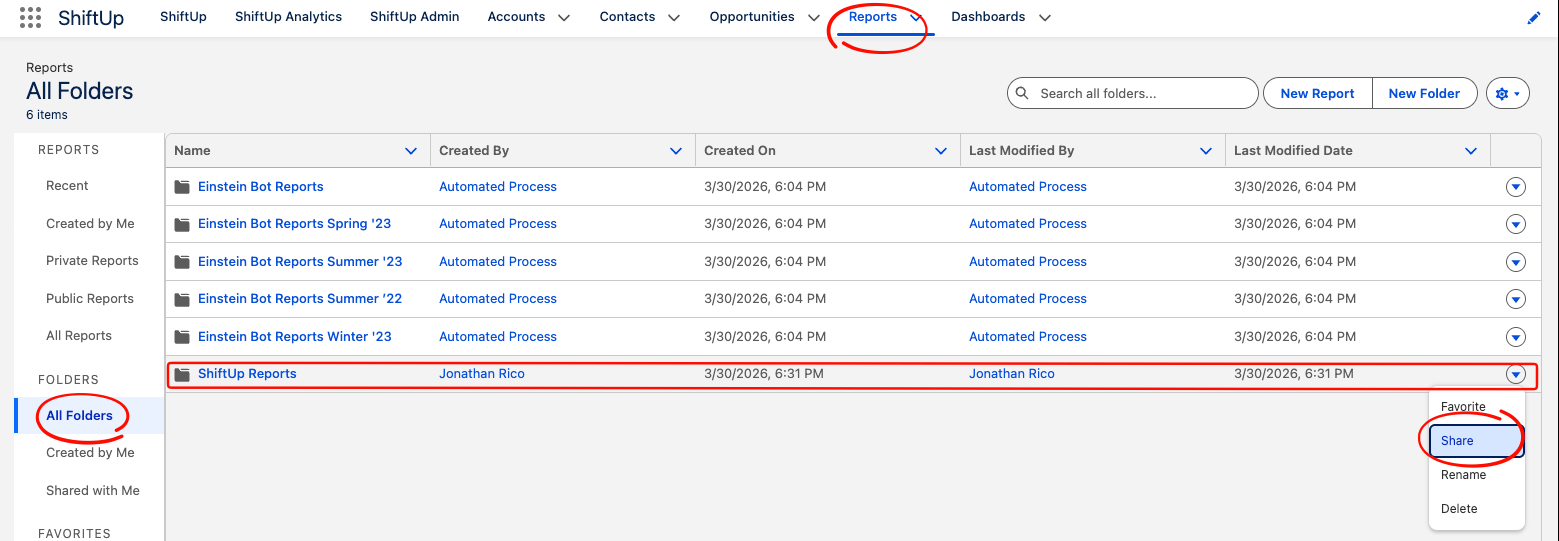
Go to the `Reports` tab, then select `All Folders`.
Look for the `ShiftUp Reports` folder in the list.
Click the actions drop-down on the right of the row and select `Share`.
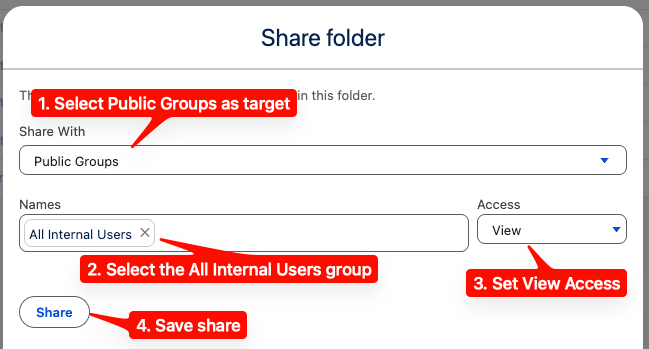
Share the folder with the `All Internal Users` group.
 ## Sharing ShiftUp Dashboards
Go to the `Dashboards` tab, then select `All Folders`.
Look for the `ShiftUp Dashboards` folder in the list.
Click the actions drop-down on the right of the row and select `Share`.
Share the folder with the `All Internal Users` group.
## Sharing ShiftUp Dashboards
Go to the `Dashboards` tab, then select `All Folders`.
Look for the `ShiftUp Dashboards` folder in the list.
Click the actions drop-down on the right of the row and select `Share`.
Share the folder with the `All Internal Users` group.