> ## Documentation Index
> Fetch the complete documentation index at: https://docs.shiftupai.com/llms.txt
> Use this file to discover all available pages before exploring further.
# Enable chat for existing customers
> Add trusted URLs to your Salesforce org so ShiftUp Chat can connect to AI services. This step is only required for existing customers — new installations include these URLs automatically.
This setup is only required for **existing customers** upgrading to a package version that includes Chat. New customers receive these trusted URLs automatically during installation.
ShiftUp Chat requires three trusted URLs in your Salesforce org to communicate with ShiftUp's AI services. You will need to add each URL as a trusted URL entry in Salesforce Setup.
## Trusted URLs to add
| API Name | URL | Protocol |
| :----------------------------- | :----------------------------- | :-------- |
| `ShiftUp_API_HTTPS_Production` | `https://api.shiftupai.com` | HTTPS |
| `ShiftUp_API_WebSocket` | `wss://api.shiftupai.com` | WebSocket |
| `ShiftUp_Assets` | `https://assets.shiftupai.com` | HTTPS |
## Steps
1. In Salesforce, go to **Setup** and search for **Trusted URLs** in the Quick Find box.
2. Click **Trusted URLs** under **Security**.
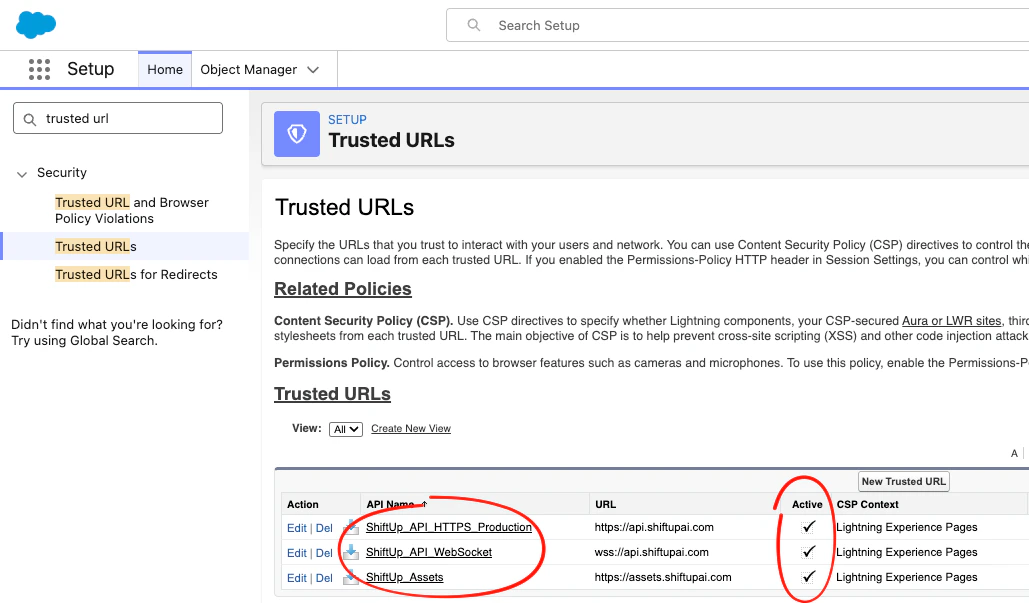 3. Click **New Trusted URL** and enter the details for each URL listed above:
* **API Name** — use the name from the table
* **URL** — use the URL from the table
* **Active** — check the box
* **CSP Context** — select **Lightning Experience Pages**
3. Click **New Trusted URL** and enter the details for each URL listed above:
* **API Name** — use the name from the table
* **URL** — use the URL from the table
* **Active** — check the box
* **CSP Context** — select **Lightning Experience Pages**
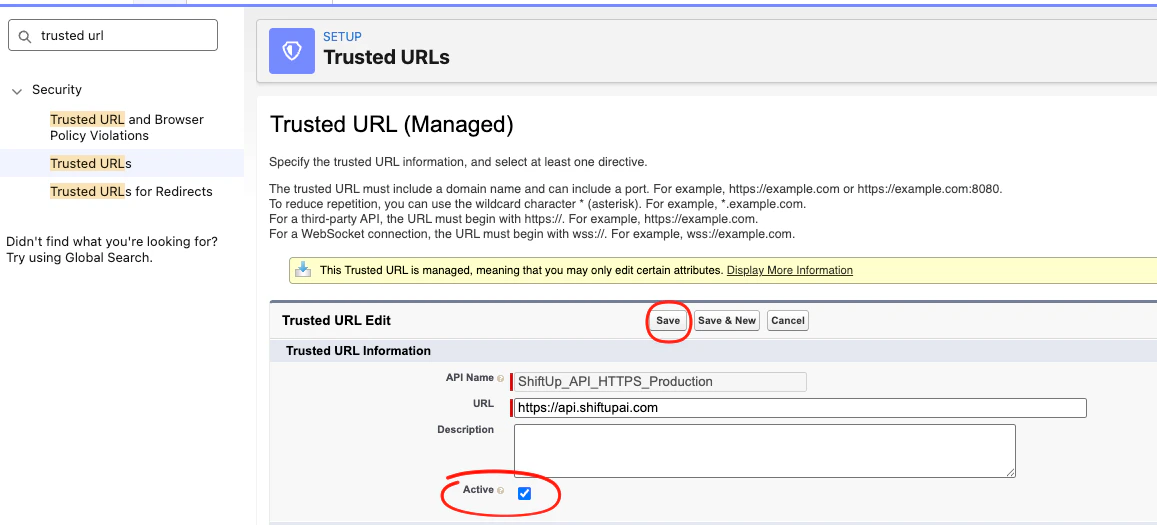 4. Click **Save** (or **Save & New** to add the next entry).
5. Repeat for all three URLs.
Once all three trusted URLs are active, Chat will be fully functional in your ShiftUp instance.
Enabling Chat will not increase the number of allocated api calls to Salesforce, it's designed to handle those api calls directly from the client's browser to ShiftUp AI.
4. Click **Save** (or **Save & New** to add the next entry).
5. Repeat for all three URLs.
Once all three trusted URLs are active, Chat will be fully functional in your ShiftUp instance.
Enabling Chat will not increase the number of allocated api calls to Salesforce, it's designed to handle those api calls directly from the client's browser to ShiftUp AI.