> ## Documentation Index
> Fetch the complete documentation index at: https://docs.shiftupai.com/llms.txt
> Use this file to discover all available pages before exploring further.
# Advanced Setup
> Branding, Operational controls, background jobs, and license checks.
## ShiftUp Enablement
Admins can enable or disable ShiftUp app functionality for users from the advanced admin area.
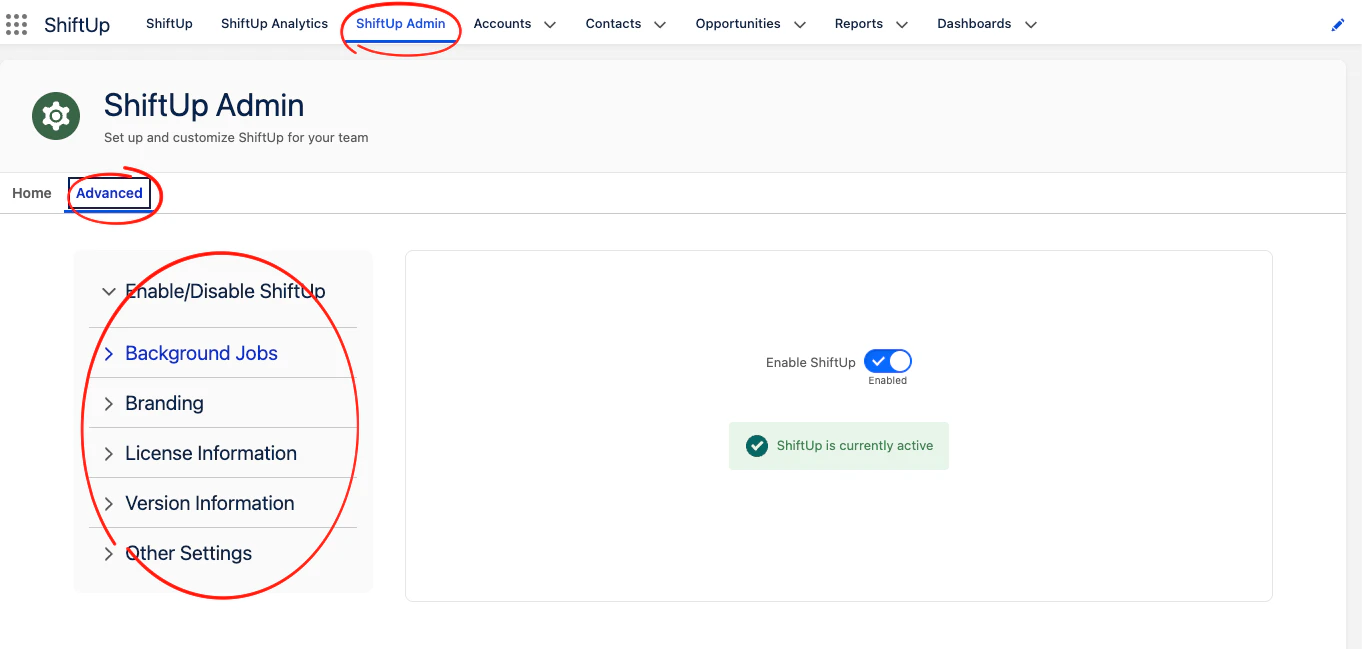 ## Enable/Disable ShiftUp
Master control to disable the ShiftUp user interface for all users, this is automatically enabled after ShiftUp activation.
## Background Jobs
ShiftUp uses scheduled jobs for recurring system operations. Review and monitor job health in Salesforce.
Common job categories include:
* Integration event cleanup
* Integration event retry processing
* Feature usage aggregation
* ShiftUp Feed Items Cleanup
## Branding
Use the branding section to configure the company name and logo displayed in the ShiftUp sidebar.
## License Information
Use the license section in the admin experience to verify active licensing status and allocation details.
## Version Information
Use the version information section to check the current version status of your ShiftUp application. You can opt-out from receiving push upgrades from here and manually install new versions of the package.
## Other Settings
Use this section to run maintenance actions and enable optional features of the application. Each action and feature contains details about the operation/functionality it controls.
## Enable/Disable ShiftUp
Master control to disable the ShiftUp user interface for all users, this is automatically enabled after ShiftUp activation.
## Background Jobs
ShiftUp uses scheduled jobs for recurring system operations. Review and monitor job health in Salesforce.
Common job categories include:
* Integration event cleanup
* Integration event retry processing
* Feature usage aggregation
* ShiftUp Feed Items Cleanup
## Branding
Use the branding section to configure the company name and logo displayed in the ShiftUp sidebar.
## License Information
Use the license section in the admin experience to verify active licensing status and allocation details.
## Version Information
Use the version information section to check the current version status of your ShiftUp application. You can opt-out from receiving push upgrades from here and manually install new versions of the package.
## Other Settings
Use this section to run maintenance actions and enable optional features of the application. Each action and feature contains details about the operation/functionality it controls.