> ## Documentation Index
> Fetch the complete documentation index at: https://docs.shiftupai.com/llms.txt
> Use this file to discover all available pages before exploring further.
# Release notes
> Monthly product updates and new features in ShiftUp.
## Support for Private Account OWD
ShiftUp now formally supports Salesforce orgs that use a **Private** Account sharing model. Configure Account Plans as Private to match, and ShiftUp will coordinate the required Account read-shares through Salesforce's standard security model whenever plans are created, reassigned, or shared. Account Plan sharing continues to govern access to the plan's strategies and feed.
See [Working with Private Account OWD](/security/private-account-owd) for the full walkthrough.
## New admin control: Disable Account Access Sharing
Admins can now toggle **Disable Account Access Sharing** to temporarily pause ShiftUp's automatic creation and restoration of Account shares if unexpected sharing behavior is observed. While enabled, plan sharing continues, but admins are responsible for ensuring plan owners, assignees, and recipients retain the Account access they need. Intended as a temporary safety measure during investigation.
## Account ownership change handling
When a Salesforce Account owner changes, ShiftUp now reconciles Account Plan access based on your **Account Plan Owner Sync** setting — reassigning plans when sync is on, or restoring the required Account shares for existing owners, assignees, and recipients when sync is off. See [Account ownership changes](/security/private-account-owd#account-ownership-changes).
## Custom Research is now generally available
Custom Components has been renamed **Custom Research** and is now enabled for all customers. Admins and managers can now build their own AI-researched content blocks that render inside Account Plans and Strategies. See [Custom Research](/product/custom-research) for the full walkthrough.
## Personal Customization
A new **Customize** entry in the left sidebar gathers your personal preferences in one place. Set the tone, length, impact, greeting, and next-step defaults ShiftUp uses when drafting outreach, plus habits to avoid. These preferences will be used on any ShiftUp generated email.
See [Customize](/product/customize) for the full walkthrough.
## Engage tab (Preview)
A new **Engage** tab is available on Sales Strategies. Engage combines a stakeholder-aware **prospecting cadence** — with AI-drafted emails, calls, and social touches — with the classic **Conversation roadmap** in a single workspace.
* **Why now + pain hypothesis** — The cadence opens with an evidence-backed callout explaining why this is a timely moment to reach out, plus the specific pain ShiftUp expects to resonate.
* **Who can act** — A stakeholder roster with influence, confidence, and recommended-vs-alternative signals. Add stakeholders from the account or create new ones inline.
* **Outreach cadence** — A flat, numbered timeline of email, phone, and social touches per stakeholder, each with subject, body, and call-script drafts.
* **Personalize in one shot** — A **Personalize** action masks the AI draft and rewrites it in your saved email style with a typewriter reveal (Undo available). If you don't have a style saved, the email-style setup wizard launches first.
* **Send through Salesforce** — Review and send emails without leaving the card.
* **Generate next 3** — When a stakeholder's cadence runs out, generate the next batch of touches in one click.
See [Engage tab](/product/engage-tab) for the full walkthrough.
## Stakeholder viewpoints
Stakeholder cards now surface **viewpoints** — the stakeholder's likely position, concerns, and priorities — that have been made available via social media posts, the press, quarterly or annual reports, or other publicly available sources. This is a new tab on the stakeholder window.
## ShiftUp Mobile
A ShiftUp mobile experience is now available within the Salesforce mobile app. Highlights include:
* **Voice notes on account plans** — Capture account notes hands-free.
* **Dashboard widgets on mobile** — The core dashboard widgets render on mobile.
* **Reliable tab boot routing** — Tabs restore to the last screen you were on.
## Strategies
* **Bulk archive (New + Active)** — The bulk archive action now appears for users with edit access. Multi-select strategies and archive them in one action; the Archived tab remains excluded.
* **Bulk assign user (New + Active)** — Multi-select strategies on both the New and Active tabs and reassign them to another user in one step. The assign dialog searches by name **or** email (2+ characters) and assigns them in one action; the Archived tab remains excluded.
* The **Value** column and value sort are now available on the **Archived** strategies tab (matching the Active and New tabs).
## Account plans
* **Bulk-assign owner** — Reassign the owner on multiple account plans from a multi-select on the account plan list, similar to strategies.
* **Activity indicator moved** — The activity indicator has moved off the company logo to a sticky-note icon pinned to the right of the plan name; long plan names now truncate cleanly. Hover over the icon in the list view to see note and meeting notetaker counts. Both refresh as notes and meeting links change.
## Bulk import (Admin)
Bulk import lets admins create Account Plans in bulk for a Seller Profile from a Salesforce Report of Accounts, instead of adding accounts one at a time. Open the **Monitored Accounts** tab on a Seller Profile, launch the **Bulk Import** wizard, pick a Salesforce Report, and ShiftUp validates the source, previews the accounts that will be brought in, kicks off the run, and tracks it as an **Import Job** you can watch to completion (with an **Abort** action for anything still running).
* **Read-only Import Jobs for non-admins** — Team members can open the **Import Jobs** page on a Seller Profile and review job history, status, and failures without needing admin rights. Starting new imports and aborting active runs still require the **Bulk Import Account Plans** permission.
## Chat
ShiftUp Chat is now more tightly integrated with the ShiftUp app, making it easier to ask questions, get context, and act on the information already in your workspace.
* **Search across ShiftUp** - Users can now ask about any strategy, account plan, or seller profile without needing to tag it directly or navigate to a specific page. Chat will search across relevant account plans, strategies, and seller profiles to find the right information and answer in context..
* **Ask anywhere in ShiftUp -** Chat can now answer questions about feed items, seller profiles, and insights from notetaker meetings, helping users understand what is happening across their accounts.
* **Look across ShiftUp data -** Users can now ask Chat to look across ShiftUp data, not just one object at a time. For example, Chat can review multiple strategies to surface the most active ones or compare one strategy with another to identify key differences.
* **External research -** ShiftUp Chat now supports external research when additional context is needed. In addition to answering questions from ShiftUp-generated research and account intelligence, Chat can look beyond existing ShiftUp research to validate, clarify, or expand on information, helping users get a more complete and current answer.
* **Flag research issues** - If users identify information that may be incorrect, outdated, or based on an unreliable source, they can call it out in the conversation, and ShiftUp will learn from the feedback.
## Dashboards
* **Multi-user filter** — The user filter on the **Pipeline** and **Adoption** dashboards now supports multi-select.
* **Total pipeline in ShiftUp accounts** — Closed opportunities are now excluded from the "Total pipeline in ShiftUp accounts" metric.
## List view filters
* **Multi-user Owner and Assignee filters** — The **Owner** filter on account plans and the **Assignee** filter on strategies now match **up to 20 users at once**, (previously one user at a time).
## Custom Components ~~(Beta)~~
Admins and managers can now build their own AI-researched content blocks that render inside Account Plans and Strategies. Define **research**, **intent**, and **schema** in a guided two-pane editor; ShiftUp generates the output as **Cards**, a **Table**, or an **Insight view**. Visibility rules — advanced filters, record overrides, and seller-profile associations — control exactly which records each component shows. See [Custom ComponentsComponents](/product/custom-research) for the full walkthrough.
## Strategies
* **Rename strategies** — Edit a strategy's name directly from the strategy overview using the pencil icon.
* **Related open opportunities** — The strategy overview now surfaces open opportunities on the related account so you can see what else is in flight.
* **Auto-archive on close** — Strategies are automatically archived when their linked opportunity is closed; archival reasons have been relabeled for clarity.
* **Account strategy selector** — From an opportunity record, users can select a ShiftUp strategy to link to the opportunity using the ShiftUp tab. Users can also view all strategies for that account from the ShiftUp tab.
* **Value column on Active tab** — The strategy **Value** column with sort are now available on the **Active** strategies tab.
## Feed Updates Now Generally Available
Never miss a critical update. ShiftUp now includes a [notification and feed system](/product/notifications-and-feed), so Account Plan and Strategy changes are always visible and traceable. Updates include:
* **Default to unread** — The Feed now defaults to unread items, so you start with what needs attention.
* **Notification content details** — Feed cards now include the impact and suggested action — so you can act immediately on any updates.
## Journey Updates
* **MEDDPICC scorecard and add-note tours** — New guided tours walk sellers through completing the MEDDPICC scorecard and adding account notes.
* **Deal Progression phase visible to all** — The Deal Progression phase on the **Your ShiftUp Journey** timeline is now visible to every user.
## Integration user setup — New Integration License option
The post-install wizard now offers a new **recommended** path for provisioning the ShiftUp integration user: **Create with Integration License**. This uses a Salesforce Integration user license plus the Salesforce API Integration permission set license, so the integration user **does not consume a paid Salesforce user license**. The wizard reports remaining license counts inline and falls back to **Create with Standard License** or **Select Existing User** when the integration license isn't available. See the updated [integration setup steps](/setup/post-installation#2-assign-shiftup-permissions-to-selected-integration-user).
## Branded PDF exports
Admins can now brand the PDFs ShiftUp generates with their own **company name** and **logo**. Configure your logo URL and enable **Include logo in PDF exports** under **ShiftUp Admin → Application Setup → Branding**, and every Account Plan, Strategy, business case, and Seller Profile PDF will use your logo in the footer. See [PDF branding](/setup/pdf-branding).
## Journey landing page
A new [Journey](/product/journey) page is now the home view when you open ShiftUp. It gives sellers an at-a-glance overview of assigned work and onboarding progress in one place.
## Real-time update notifications and feed (beta)
Never miss a critical update. ShiftUp now includes a [notifications and feed ](/product/notifications-and-feed)system, so Account Plan and Strategy changes are always visible and traceable.
**NOTE:** You may see the "feed" feature on your menu with an empty feed while we prepare for general availability.
## New Activity tab on Sales Strategies
A new [Activity](https://docs.shiftupai.com/onboarding/sales-strategy#activity) tab on Sales Strategies provides a centralized view of all engagement related to a strategy.
## Chat
**Page-aware context** — [ShiftUp Chat](/product/chat-preview) is now contextual to the page you're on. When you open Chat from an account plan or strategy, that record is automatically set as the conversation's context — no need to tag it with `@`. The context chip above the input shows what Chat is anchored to, and follows you as you navigate. You can still use `@` to bring additional records into the conversation.
**Compare multiple objects** — Chat can now compare multiple objects in a single conversation. For example, use Chat to weigh competing strategies on the same account, contrast hypotheses and pain points, or evaluate which deal is further along on MEDDPICC.
## Context Console (Admin)
A new [Context Console](/setup/context-console) is available under **ShiftUp Admin**. Admins can now run any enabled CRM [context provider](/setup/context-providers) against a specific account plan and inspect the exact JSON it returns — making it easy to validate configurations, troubleshoot missing context, and confirm integration-user permissions before data flows into account plans and strategies. Available to users with the ShiftUp admin permission and View All Data when CRM Context is enabled.
## Experience Enhancements
* The adoption dashboard now includes new widgets to indicate onboarding progress from the Journey page.
* The email composer window on the Stakeholder Actions tab now allows resizing or full-screen mode.
* Account and Strategy list views will now include the number of records displayed and the total number of records.
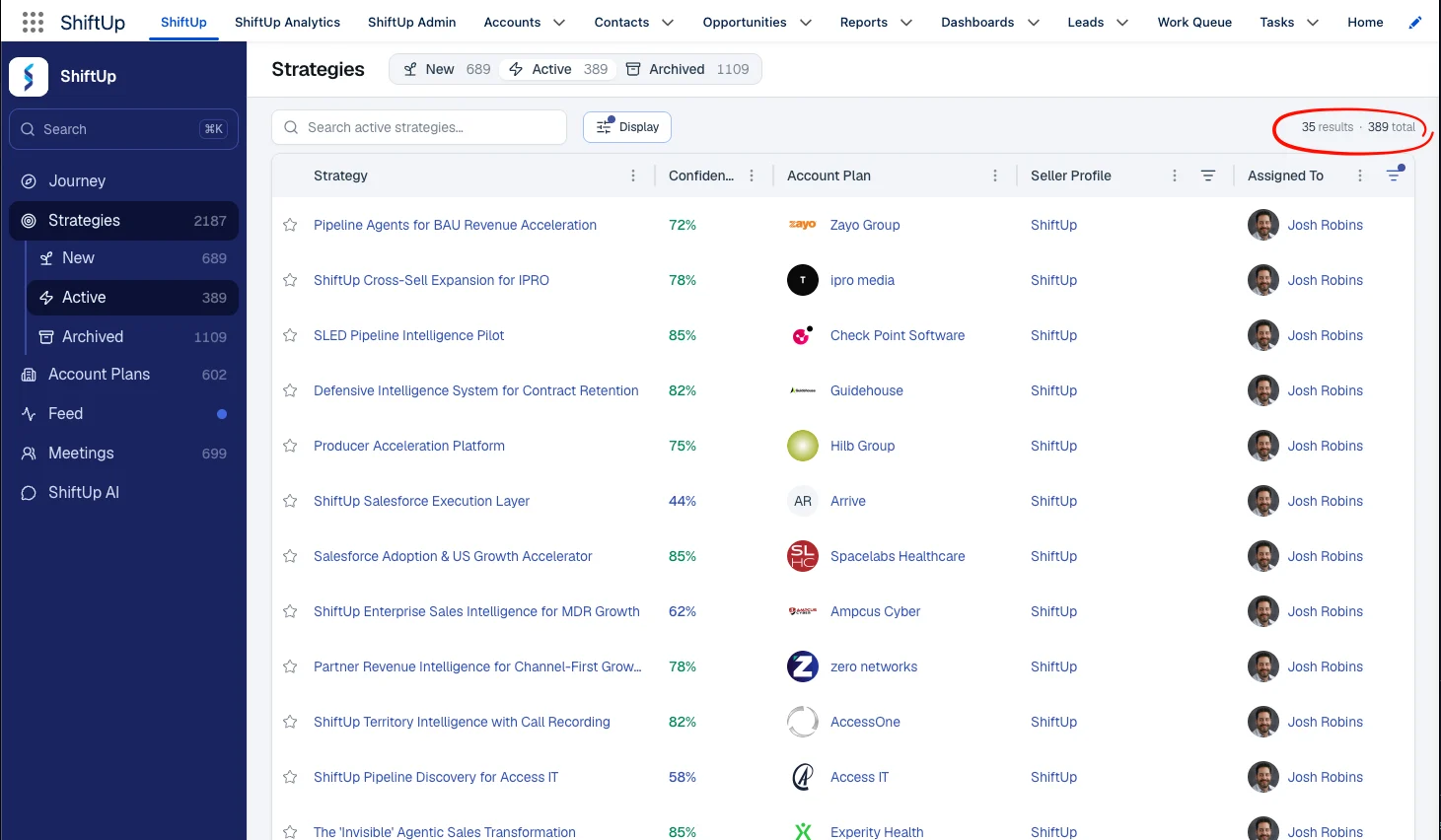 * Account and Strategy list views now include an **Unviewed assigned to me** filter, so you can jump straight to records that are assigned to you and haven't been opened yet.
## Cross-sell strategies are now generally available
[Cross-sell strategies](https://docs.shiftupai.com/product/cross-sell-strategies) are now generally available to all customers. ShiftUp automatically identifies opportunities to expand revenue within accounts you already serve and generates a tailored strategy — including hypotheses, pain points, stakeholders, and a business case — framed around growing the existing relationship. Implement Context Provider to better inform ShiftUp of existing customers.
## Context Providers is now generally available
[Context Providers](/setup/context-providers) is now generally available. Connect ShiftUp to additional CRM data sources — such as won opportunities and account details from Salesforce — to produce more accurate account plans and sales strategies.
## Chat (Preview)
[ShiftUp Chat](/product/chat-preview) is a conversation AI assistant built into the platform. You can ask questions about your accounts, strategies, stakeholders, and deal context - and get instance, sourced answers without leaving Salesforce.
**Chat (Preview) trusted URLs for existing customers** — Customers upgrading to a package version that includes Chat now have a guided setup for adding the required trusted URLs to their Salesforce org. New installations include these URLs automatically. See [Enable chat for existing customers](https://docs.shiftupai.com/setup/enable-chat).
## Meetings (Beta)
A new Meetings feature was added to the menu of ShiftUp. A notetaker sends an AI bot to your meetings to record, transcribe, and extract insights. Transcripts, participants, and AI-generated insights are stored as Salesforce records and linked to your Salesforce accounts, opportunities, and contacts. Additionally, the insights from the meeting inform the ShiftUp Account Plan and Strategies, which may result in an updated or new strategy. Learn how to [Use Shiftup Meetings](/how-to/use-shiftup-meetings).
## New activity tab on strategies
Strategies now include a dedicated **Activity** tab, giving you a centralized view of all actions and events related to a strategy. This tab includes all ShiftUp meetings, and all events and tasks from the related Salesforce Contact, Account, and Opportunity records. Track all engagement in one place without switching between tabs. Learn more about the [Activity Tab](https://docs.shiftupai.com/onboarding/sales-strategy#activity).
## Confidence score history (Beta)
A new **History** tab in the Shiftup Strategy tracks changes in Confidence Score over time. Monitor how strategy health evolves with a visual timeline of score updates, helping you identify actions and insights that increase the Strategy's viability. Learn more about [Confidence Score History](https://docs.shiftupai.com/onboarding/sales-strategy#history).
## Add accounts to ShiftUp from the Salesforce Account record
You can now add accounts to ShiftUp directly from the Salesforce Account object. When viewing an Account record in Salesforce, the ShiftUp tab now lets you add this account to your monitored ShiftUp accounts.
## Improved adoption dashboard
The Adoption Dashboard in **ShiftUp Analytics** has been enhanced with clearer visualizations and more actionable metrics, making it easier to measure and drive platform usage across your organization.
## Email signatures on AI-generated emails
AI-generated emails now automatically include your email signature found in your Salesforce profile, ensuring every outbound message maintains a professional, consistent appearance without manual editing.
## Persistent view filters
Filters applied to Account and Strategy list views are now persistent across sessions. Your preferred sorting, filtering, and display settings are saved so you can pick up exactly where you left off.
## Real-time update notifications and feed (Beta)
Never miss a critical update. ShiftUp now includes a notification and feed system, so Account Plan and Strategy changes are always visible and traceable.
* **Master feed** — Accessible from the left-hand menu, this view shows all updates across all Account Plans and Strategies in your organization.
* Account and Strategy list views now include an **Unviewed assigned to me** filter, so you can jump straight to records that are assigned to you and haven't been opened yet.
## Cross-sell strategies are now generally available
[Cross-sell strategies](https://docs.shiftupai.com/product/cross-sell-strategies) are now generally available to all customers. ShiftUp automatically identifies opportunities to expand revenue within accounts you already serve and generates a tailored strategy — including hypotheses, pain points, stakeholders, and a business case — framed around growing the existing relationship. Implement Context Provider to better inform ShiftUp of existing customers.
## Context Providers is now generally available
[Context Providers](/setup/context-providers) is now generally available. Connect ShiftUp to additional CRM data sources — such as won opportunities and account details from Salesforce — to produce more accurate account plans and sales strategies.
## Chat (Preview)
[ShiftUp Chat](/product/chat-preview) is a conversation AI assistant built into the platform. You can ask questions about your accounts, strategies, stakeholders, and deal context - and get instance, sourced answers without leaving Salesforce.
**Chat (Preview) trusted URLs for existing customers** — Customers upgrading to a package version that includes Chat now have a guided setup for adding the required trusted URLs to their Salesforce org. New installations include these URLs automatically. See [Enable chat for existing customers](https://docs.shiftupai.com/setup/enable-chat).
## Meetings (Beta)
A new Meetings feature was added to the menu of ShiftUp. A notetaker sends an AI bot to your meetings to record, transcribe, and extract insights. Transcripts, participants, and AI-generated insights are stored as Salesforce records and linked to your Salesforce accounts, opportunities, and contacts. Additionally, the insights from the meeting inform the ShiftUp Account Plan and Strategies, which may result in an updated or new strategy. Learn how to [Use Shiftup Meetings](/how-to/use-shiftup-meetings).
## New activity tab on strategies
Strategies now include a dedicated **Activity** tab, giving you a centralized view of all actions and events related to a strategy. This tab includes all ShiftUp meetings, and all events and tasks from the related Salesforce Contact, Account, and Opportunity records. Track all engagement in one place without switching between tabs. Learn more about the [Activity Tab](https://docs.shiftupai.com/onboarding/sales-strategy#activity).
## Confidence score history (Beta)
A new **History** tab in the Shiftup Strategy tracks changes in Confidence Score over time. Monitor how strategy health evolves with a visual timeline of score updates, helping you identify actions and insights that increase the Strategy's viability. Learn more about [Confidence Score History](https://docs.shiftupai.com/onboarding/sales-strategy#history).
## Add accounts to ShiftUp from the Salesforce Account record
You can now add accounts to ShiftUp directly from the Salesforce Account object. When viewing an Account record in Salesforce, the ShiftUp tab now lets you add this account to your monitored ShiftUp accounts.
## Improved adoption dashboard
The Adoption Dashboard in **ShiftUp Analytics** has been enhanced with clearer visualizations and more actionable metrics, making it easier to measure and drive platform usage across your organization.
## Email signatures on AI-generated emails
AI-generated emails now automatically include your email signature found in your Salesforce profile, ensuring every outbound message maintains a professional, consistent appearance without manual editing.
## Persistent view filters
Filters applied to Account and Strategy list views are now persistent across sessions. Your preferred sorting, filtering, and display settings are saved so you can pick up exactly where you left off.
## Real-time update notifications and feed (Beta)
Never miss a critical update. ShiftUp now includes a notification and feed system, so Account Plan and Strategy changes are always visible and traceable.
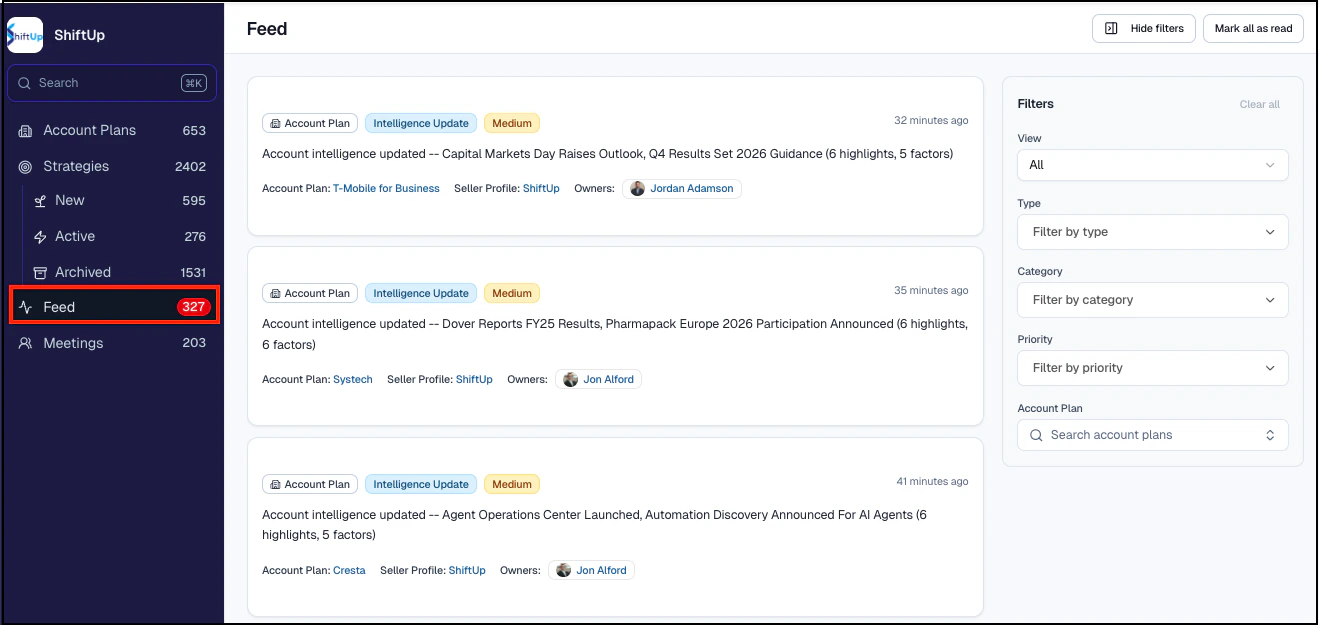
* **Master feed** — Accessible from the left-hand menu, this view shows all updates across all Account Plans and Strategies in your organization.
 * **Salesforce bell notifications** — Account Plan and Strategy owners receive alerts with a summary of what changed and a direct link to the updated record.
* **Record feed** — A new tab within each Account Plan or Strategy shows that record's full update history.
* **Master feed** — Accessible from the left-hand menu, this view shows all updates across every Account Plan and Strategy in your organization.
* **Filtering and search** — Filter by type (Account Plan or Strategy updates), update category (Intelligence or Strategy), priority (High, Medium, Low), or search for a specific Account Plan.
## Mass archive strategies
You can now archive multiple strategies from the new strategies tab:
1. Click **Select** at the top of your strategy display.
2. Check the boxes for the strategies you want to archive.
3. Click **Archive** and confirm your selection.
Archived strategies stop being analyzed but can be restored later. Active strategies and Account Plans for the same account are unaffected.
## ShiftUp adoption dashboards
New dashboards in the **ShiftUp Analytics** module provide real-time visibility into how your organization is using ShiftUp. Navigate to **ShiftUp Analytics** and click the **Adoption** tab to see:
* **Plan and strategy velocity** — Status and volume of your account plans and strategies, to determine which are being viewed and by whom.
* **AI efficiency** — Total number of AI-generated emails and call scripts, quantifying time savings.
* **Stakeholder conversions** — How effectively your team is converting key stakeholders.
* **Favorites and high-value targets** — Volume of Account Plans and Strategies being favorited across the company.
## Email and call enhancements
* **Stand-alone call scripts** — Generate call scripts outside of Cadences.
* **Log calls directly** — Use "Log Call Notes" to record calls into Salesforce without switching screens.
* **Strategy activation prompt** — A new prompt reminds users to activate strategies when generating emails or call scripts. This can be turned off in Admin settings.
* **Salesforce email signatures** — ShiftUp-generated emails now include your Salesforce email signature from Settings > Email > My Email Settings.
* **Generate emails without an email address** — Content is generated even when no email address is present, allowing you to obtain the address before sending.
## Sales engagement
ShiftUp can generate personalized email and call scripts aligned to your sales strategy. Choose to generate a stand-alone email or use Salesforce Cadences (requires Sales Engagement in Sales Cloud).
To get started, click on a stakeholder within a Sales Strategy and use the **Actions** or **Cadence** tabs on the side panel.
* **Stand-alone emails** — Click "Generate Email Message" to create a draft you can tailor, copy, or send directly from ShiftUp. Sending records the activity on the contact or lead record.
* **Cadence integration** — Add stakeholders to cadences (they must be converted to a lead or contact first), then generate email or call scripts for each cadence step using "Generate with AI."
* **Context-aware content** — Emails may reference previous calls by checking activity history on the contact or lead record.
**Call logging** — Use "Log Call Notes" to record notes on the logged call record associated with the lead or contact.
Reference the [Using Emails and Calls in a Cadence](/how-to/use-emails-calls-in-cadence) page for more information.
## Account plan updates
* **Account plan notes** — Add context and insights that may not be available from external sources. Notes can now be entered before generating the initial plan through the Seller Profile "Manage Account" function.
* **On-demand refresh** — Request an immediate Account Plan refresh via the ellipsis menu. The default refresh is weekly (or daily for active accounts if configured by your admin).
* **Automated owner synchronization** — Automatically sync Salesforce Account Owners with ShiftUp Account Plans and Strategies. Enable this in ShiftUp Admin > Other Settings.
## Account plan and strategy list view improvements
Several improvements to drive efficiency with customizable displays:
* **Display filter** — New filter button for sorting, filtering (favorites, owned by me, assigned to me, unmonitored accounts), choosing display columns, and pinning the name column.
* **Column sorting and filtering** — Sort via the ellipsis on column headers; filter via the filter icon.
* **Resizable columns** — Drag separator bars to resize columns.
* **Contextual shortcuts** — Right-click on any row for quick actions like copying links, viewing details, or reassigning.
## AI sources cited
ShiftUp now shows the comprehensive list of sources used to develop each Account Plan and Strategy. Find the list in the **Sources** tab, and see inline citations via the info icon within the text.
## Admin updates
* **Push upgrades** — ShiftUp now delivers automatic upgrades to the Salesforce Managed Application. View your version in ShiftUp Admin > Advanced Settings > Version Information. Push upgrades can be disabled if needed.
* **Refresh frequency restriction** — Restrict account plan refresh frequency controls to administrators only via ShiftUp Admin > Advanced Settings.
## Smarter, more concise AI-powered seller profiles
The AI Seller Profile Generator now produces more concise, relevant profiles, cutting the fluff and surfacing targeted guidance. We encourage users to offer insights that are not available on public forums, such as whether to include or exclude specific products and internal selling guidance.
## Expanded seller permissions
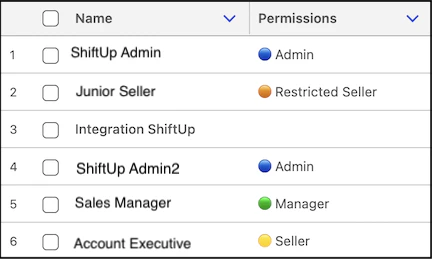
A new "Restricted Seller" permission prevents specific sellers from adding accounts to a Seller Profile while keeping other seller capabilities intact.
To activate, go to the ShiftUp Admin console and navigate to **ShiftUp Personas Management**. Assign "Restricted Seller" to the appropriate users. Existing users with the "Seller" permission will continue to be able to add accounts.
* **Salesforce bell notifications** — Account Plan and Strategy owners receive alerts with a summary of what changed and a direct link to the updated record.
* **Record feed** — A new tab within each Account Plan or Strategy shows that record's full update history.
* **Master feed** — Accessible from the left-hand menu, this view shows all updates across every Account Plan and Strategy in your organization.
* **Filtering and search** — Filter by type (Account Plan or Strategy updates), update category (Intelligence or Strategy), priority (High, Medium, Low), or search for a specific Account Plan.
## Mass archive strategies
You can now archive multiple strategies from the new strategies tab:
1. Click **Select** at the top of your strategy display.
2. Check the boxes for the strategies you want to archive.
3. Click **Archive** and confirm your selection.
Archived strategies stop being analyzed but can be restored later. Active strategies and Account Plans for the same account are unaffected.
## ShiftUp adoption dashboards
New dashboards in the **ShiftUp Analytics** module provide real-time visibility into how your organization is using ShiftUp. Navigate to **ShiftUp Analytics** and click the **Adoption** tab to see:
* **Plan and strategy velocity** — Status and volume of your account plans and strategies, to determine which are being viewed and by whom.
* **AI efficiency** — Total number of AI-generated emails and call scripts, quantifying time savings.
* **Stakeholder conversions** — How effectively your team is converting key stakeholders.
* **Favorites and high-value targets** — Volume of Account Plans and Strategies being favorited across the company.
## Email and call enhancements
* **Stand-alone call scripts** — Generate call scripts outside of Cadences.
* **Log calls directly** — Use "Log Call Notes" to record calls into Salesforce without switching screens.
* **Strategy activation prompt** — A new prompt reminds users to activate strategies when generating emails or call scripts. This can be turned off in Admin settings.
* **Salesforce email signatures** — ShiftUp-generated emails now include your Salesforce email signature from Settings > Email > My Email Settings.
* **Generate emails without an email address** — Content is generated even when no email address is present, allowing you to obtain the address before sending.
## Sales engagement
ShiftUp can generate personalized email and call scripts aligned to your sales strategy. Choose to generate a stand-alone email or use Salesforce Cadences (requires Sales Engagement in Sales Cloud).
To get started, click on a stakeholder within a Sales Strategy and use the **Actions** or **Cadence** tabs on the side panel.
* **Stand-alone emails** — Click "Generate Email Message" to create a draft you can tailor, copy, or send directly from ShiftUp. Sending records the activity on the contact or lead record.
* **Cadence integration** — Add stakeholders to cadences (they must be converted to a lead or contact first), then generate email or call scripts for each cadence step using "Generate with AI."
* **Context-aware content** — Emails may reference previous calls by checking activity history on the contact or lead record.
**Call logging** — Use "Log Call Notes" to record notes on the logged call record associated with the lead or contact.
Reference the [Using Emails and Calls in a Cadence](/how-to/use-emails-calls-in-cadence) page for more information.
## Account plan updates
* **Account plan notes** — Add context and insights that may not be available from external sources. Notes can now be entered before generating the initial plan through the Seller Profile "Manage Account" function.
* **On-demand refresh** — Request an immediate Account Plan refresh via the ellipsis menu. The default refresh is weekly (or daily for active accounts if configured by your admin).
* **Automated owner synchronization** — Automatically sync Salesforce Account Owners with ShiftUp Account Plans and Strategies. Enable this in ShiftUp Admin > Other Settings.
## Account plan and strategy list view improvements
Several improvements to drive efficiency with customizable displays:
* **Display filter** — New filter button for sorting, filtering (favorites, owned by me, assigned to me, unmonitored accounts), choosing display columns, and pinning the name column.
* **Column sorting and filtering** — Sort via the ellipsis on column headers; filter via the filter icon.
* **Resizable columns** — Drag separator bars to resize columns.
* **Contextual shortcuts** — Right-click on any row for quick actions like copying links, viewing details, or reassigning.
## AI sources cited
ShiftUp now shows the comprehensive list of sources used to develop each Account Plan and Strategy. Find the list in the **Sources** tab, and see inline citations via the info icon within the text.
## Admin updates
* **Push upgrades** — ShiftUp now delivers automatic upgrades to the Salesforce Managed Application. View your version in ShiftUp Admin > Advanced Settings > Version Information. Push upgrades can be disabled if needed.
* **Refresh frequency restriction** — Restrict account plan refresh frequency controls to administrators only via ShiftUp Admin > Advanced Settings.
## Smarter, more concise AI-powered seller profiles
The AI Seller Profile Generator now produces more concise, relevant profiles, cutting the fluff and surfacing targeted guidance. We encourage users to offer insights that are not available on public forums, such as whether to include or exclude specific products and internal selling guidance.
## Expanded seller permissions
A new "Restricted Seller" permission prevents specific sellers from adding accounts to a Seller Profile while keeping other seller capabilities intact.
To activate, go to the ShiftUp Admin console and navigate to **ShiftUp Personas Management**. Assign "Restricted Seller" to the appropriate users. Existing users with the "Seller" permission will continue to be able to add accounts.
 ## MEDDPICC support
ShiftUp now generates an evidence-based MEDDPICC report that evaluates strategy health by analyzing key MEDDPICC components and providing supporting evidence. The report is available as a PDF and includes a summary of strengths, weaknesses, detailed evidence, gaps, and prescriptive next steps.
To view the report, open a Strategy and select the **MEDDPICC** tab.
## Account plan notes
Sellers can add notes to Account Plans to include context not available from external sources, such as internal project details or meeting notes. Adding a note refreshes the Account Plan and may introduce new strategies.
To add a note, navigate to the Account Plan, select the **Notes** tab, and click **Add Note**.
## Link strategies to existing opportunities
You can now link strategies to existing Salesforce opportunities, in addition to converting strategies to new opportunities. This linkage is reflected in ShiftUp analytics.
* **When activating** - Click "Activate Strategy" and choose "Link to Existing Opportunity."
* **On active strategies** — Use "Link to Opportunity" in the upper right of the strategy overview.
* **To remove** — Use the kebab menu and select "Unlink Opportunity."
## Favorite strategies
Mark Account Plans and Strategies as favorites with the star icon at the top of the screen or in the list view. You can also filter list views to display only favorites. Use this to prioritize your most important plans and strategies.
## Lead and contact creation improvements
Converting stakeholders to Salesforce contacts or leads now includes the job title, and the lead source is set to "ShiftUp" for better tracking.
## Include all strategies in the account plan download
Account Plan PDF downloads now include associated strategies. Strategy-level PDFs also support downloading all sections or specific sections, like the Business Case. Use the kebab menu from the Account Plan or Strategy to perform this action.
## Stakeholder email discovery enhancements
Stakeholder profiles now automatically include verified email addresses, making it faster to identify the right contacts and initiate outreach. Enriched profiles combine role, influence level, and contact information into a single view.
## Stakeholder to contact/lead conversion
Convert stakeholders directly into new Contacts or Leads, or match them to existing CRM records.
## Account plan refreshes
Account Plans now refresh automatically weekly, ensuring you always have the most current account intelligence. You can always request a refresh on demand.
## AI assisted seller profile generation
Let ShiftUp suggest the company profile and the ideal customer profile based on our AI research. You can enrich what's been generated to steer research focus on specific areas.
To use this feature, create or open a seller profile and click **Generate with ShiftUp Intelligence**, then reload the seller profile to review the generated content.
## Seller profile PDF export
Export any seller profile as a formatted PDF for sharing, reporting, or record-keeping. Use the kebab menu from the Seller Profile to perform this action.
## Improved search experience
Search now surfaces related opportunity strategies when you look up an account, giving you deeper context from a single search.
## Sync the account plan and account owners
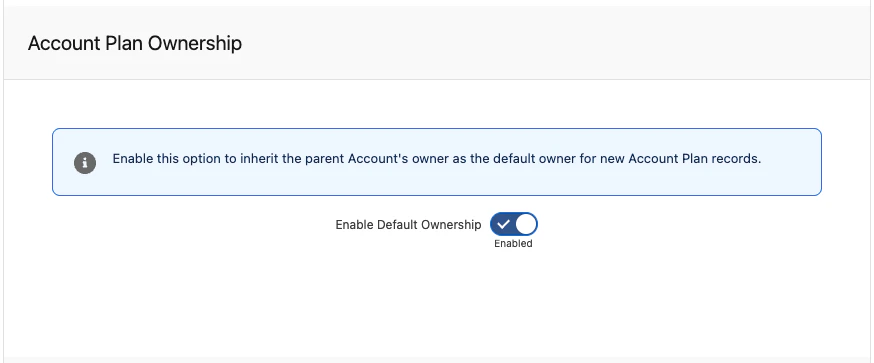
Automatic syncing between Account Owners and Account Plan Owners ensures consistent ownership. When enabled, new Account Plans inherit the parent Account's owner. To enable this, navigate to ShiftUp Admin > Other Settings > Account Plan Ownership.
## MEDDPICC support
ShiftUp now generates an evidence-based MEDDPICC report that evaluates strategy health by analyzing key MEDDPICC components and providing supporting evidence. The report is available as a PDF and includes a summary of strengths, weaknesses, detailed evidence, gaps, and prescriptive next steps.
To view the report, open a Strategy and select the **MEDDPICC** tab.
## Account plan notes
Sellers can add notes to Account Plans to include context not available from external sources, such as internal project details or meeting notes. Adding a note refreshes the Account Plan and may introduce new strategies.
To add a note, navigate to the Account Plan, select the **Notes** tab, and click **Add Note**.
## Link strategies to existing opportunities
You can now link strategies to existing Salesforce opportunities, in addition to converting strategies to new opportunities. This linkage is reflected in ShiftUp analytics.
* **When activating** - Click "Activate Strategy" and choose "Link to Existing Opportunity."
* **On active strategies** — Use "Link to Opportunity" in the upper right of the strategy overview.
* **To remove** — Use the kebab menu and select "Unlink Opportunity."
## Favorite strategies
Mark Account Plans and Strategies as favorites with the star icon at the top of the screen or in the list view. You can also filter list views to display only favorites. Use this to prioritize your most important plans and strategies.
## Lead and contact creation improvements
Converting stakeholders to Salesforce contacts or leads now includes the job title, and the lead source is set to "ShiftUp" for better tracking.
## Include all strategies in the account plan download
Account Plan PDF downloads now include associated strategies. Strategy-level PDFs also support downloading all sections or specific sections, like the Business Case. Use the kebab menu from the Account Plan or Strategy to perform this action.
## Stakeholder email discovery enhancements
Stakeholder profiles now automatically include verified email addresses, making it faster to identify the right contacts and initiate outreach. Enriched profiles combine role, influence level, and contact information into a single view.
## Stakeholder to contact/lead conversion
Convert stakeholders directly into new Contacts or Leads, or match them to existing CRM records.
## Account plan refreshes
Account Plans now refresh automatically weekly, ensuring you always have the most current account intelligence. You can always request a refresh on demand.
## AI assisted seller profile generation
Let ShiftUp suggest the company profile and the ideal customer profile based on our AI research. You can enrich what's been generated to steer research focus on specific areas.
To use this feature, create or open a seller profile and click **Generate with ShiftUp Intelligence**, then reload the seller profile to review the generated content.
## Seller profile PDF export
Export any seller profile as a formatted PDF for sharing, reporting, or record-keeping. Use the kebab menu from the Seller Profile to perform this action.
## Improved search experience
Search now surfaces related opportunity strategies when you look up an account, giving you deeper context from a single search.
## Sync the account plan and account owners
Automatic syncing between Account Owners and Account Plan Owners ensures consistent ownership. When enabled, new Account Plans inherit the parent Account's owner. To enable this, navigate to ShiftUp Admin > Other Settings > Account Plan Ownership.