> ## Documentation Index
> Fetch the complete documentation index at: https://docs.shiftupai.com/llms.txt
> Use this file to discover all available pages before exploring further.

# Create a custom Apex context provider

ShiftUp already offers out-of-the-box context providers for common standard objects related to Accounts, custom objects directly related to Accounts, Pricebooks, and other top-level objects used as catalogs.

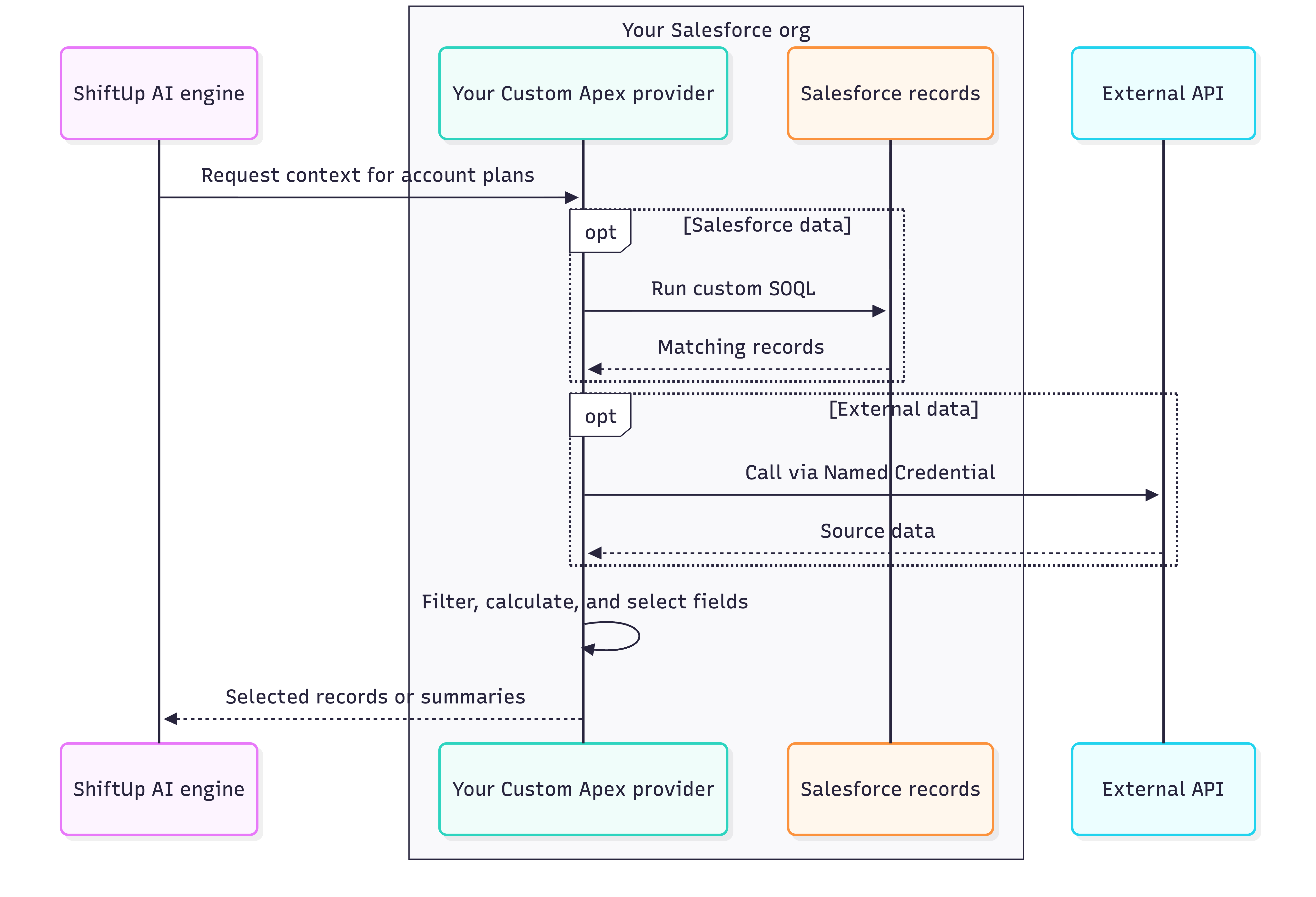
Some scenarios need more control over the data retrieved or shared with ShiftUp. For these advanced use cases, custom Apex context providers let you apply business logic, shape the results, and connect to external services. This guide assumes you know Apex, SOQL, and Salesforce deployment.

## **When to use a custom provider**

Use custom Apex when your requirements go beyond the built-in providers' configuration options:

| Use case | Example | Why custom Apex is needed |
| :- | :- | :- |
| Reduce noisy or irrelevant context | Return renewals due in the next 90 days only for Accounts with unresolved support escalations. | Use custom SOQL across objects to select relevant records beyond the built-in filters. |
| Limit the context shared with ShiftUp | Share renewal value at risk by product while keeping individual contract details in Salesforce. | Use aggregate SOQL and Apex to return only the summaries and metrics you choose to share. |
| External APIs with credentials you control | Fetch an Account's subscriptions from an external billing service. | Use Salesforce as a proxy through Named Credentials and External Credentials; you retain control of API keys and access while ShiftUp receives selected data. |

## **How it works**

<img src="https://mintcdn.com/shiftup/c9iVhqemxCsE-EDj/images/ShiftUp-AI-Engine-Data-2026-10-13-042611.png?fit=max&auto=format&n=c9iVhqemxCsE-EDj&q=85&s=de9ea062c1d9377657d997b1abbf39ed" alt="Shift Up AI Engine Data 2026 10 13 042611" width="5397" height="3680" data-path="images/ShiftUp-AI-Engine-Data-2026-10-13-042611.png" />

## **1. Understand the contract**

ShiftUp provides the `tvggs.GSAiContextProvider` interface to discover custom providers and understand what they supply. The interface defines the provider's identity, the label and description shown in the UI, and the behavior for fetching data to send to the AI engine. Its description also guides the ShiftUp AI agent on how to interpret and use that data.

Implement `tvggs.GSAiContextProvider` in a `global` class with a no-argument constructor. A provider runs when it is available (via the`isAvailable` method), enabled on the requested seller profile, and active for the request (via the `isActive` method).

<table>
  <colgroup>
    <col width="321" />

    <col width="390" />
  </colgroup>

  <thead>
    <tr>
      <th>Method</th>
      <th>Purpose</th>
    </tr>
  </thead>

  <tbody>
    <tr>
      <td>`getProviderName()`</td>
      <td>Stable, org-unique identifier used in saved configuration and request filters.</td>
    </tr>

    <tr>
      <td>`getLabel()`</td>
      <td>Display name for admins.</td>
    </tr>

    <tr>
      <td>`getDescription()`</td>
      <td>Describes the data, scope, and limits, and gives the ShiftUp AI agent instructions on how to interpret and use the data.</td>
    </tr>

    <tr>
      <td>`isAvailable()`</td>
      <td>Controls whether the provider is available in the org. Use it for a controlled rollout, or return `true` when no availability restriction is needed.</td>
    </tr>

    <tr>
      <td>`isActive(sellerProfileInfo, request)`</td>
      <td>Whether it applies to this request; ShiftUp already checks seller profile enablement.</td>
    </tr>

    <tr>
      <td>`getContext(sellerProfileInfo, request, response)`</td>
      <td>Retrieve data and populate the response supplied by ShiftUp.</td>
    </tr>
  </tbody>
</table>

ShiftUp passes `sellerProfileInfo` and `request` to both `isActive()` and `getContext()`. It also supplies `response` to `getContext()` for your provider to populate.

### `sellerProfileInfo`**: the seller profile configuration**

Type: `tvggs.GSAiContextInfo.SellerProfileInfo`. Provides the identity and saved configuration of the seller profile requesting context. Treat this information as read-only input.

| Method | Returns | Purpose |
| :- | :- | :- |
| `getSellerProfileId()` | `Id` | Identifies the seller profile for this call. Use it when scoping profile-specific data. |
| `getConfigOptions()` | `Map<String, Object>` | Read the seller profile's saved context settings. Treat the returned map as read-only. |

Example of saved settings your provider might receive from `getConfigOptions()`, shown as JSON. Object names and IDs are illustrative:

```json theme={null}
{
  "enabledProviderNames": ["AccPlanContactContextProvider", "AcmeSubscriptions"],
  "pricebookIds": ["PRICEBOOK_ID"],
  "dynamicCtxProviderConfig": {
    "AccPlanAccCustomObjsCtxProvider": {
      "customObjectRelationships": [
        {
          "objectName": "My_Custom_Object__c",
          "relationshipName": "My_Custom_Objects__r",
          "parentLookupFieldName": "Account__c",
          "description": "A custom object linked to this Account.",
          "limit": 25,
          "sortFieldName": "CreatedDate",
          "sortDirection": "DESC"
        }
      ]
    }
  }
}
```

Here, `enabledProviderNames` lists the providers already enabled on the seller profile`pricebookIds` lists its selected pricebooks, and `dynamicCtxProviderConfig` reflects its saved **Account Custom Objects** settings. Do not modify this map to change settings; configuration changes belong in the seller profile's settings and its only passed along for informational purposes.

### `request`**: the context being requested**

Type: `tvggs.GSAiContextInfo.GSAiContextInfoRequest`. Its properties are read-only inputs to your provider.

| Property | Type | Purpose |
| :- | :- | :- |
| `sellerProfileId` | `String` | The seller profile ID supplied with the request. |
| `recordIds` | `List<String>` | The records that need context. Your provider resolves the relevant data for these IDs. ShiftUp may invoke this provider with one or more Account Plan Ids. |
| `options` | `Map<String, String>` | Request options interpreted by ShiftUp, including provider selection. Custom providers can generally ignore this map. |

### `response`**: the context your provider returns**

Type: `tvggs.ProviderRecordContextResponse`. ShiftUp creates this output container with your provider's name and description. Populate it with selected data or report a failure; ShiftUp handles returning it to the AI engine.

A `tvggs.RecordContextResult` groups context for **one requested account plan ID**. It contains named lists of Salesforce sObjects (`contextRecords`), custom data values (`contextData`), or both. Custom data values use `tvggs.RecordContextResult.RecordValue` and `tvggs.RecordContextResult.FieldValue` to represent calculated metrics or facts from external systems.

| Method | What you provide |
| :- | :- |
| `addResult(result)` | A `tvggs.RecordContextResult` containing an account plan ID and its context. For example, a `Subscriptions` list of `Subscription__c` records, each with a lookup to a product package. |
| `addReferences(referenceName, records)` | A named `List<SObject>` of shared lookup records. For example, the `Product_Package__c` records referenced by those subscriptions, included once instead of repeating package details in every subscription. |
| `error(message)` | A safe, actionable error message. Marks this provider's response as failed. |

Below is an example of what the context provider response for Account subscription data will look like, the first account plan has two subscriptions and the second has one. All three reference the same product package. Each `addResult()` supplies one account plan's subscriptions; `addReferences('ProductPackages', packages)` supplies the shared package details once. Custom objects and IDs are illustrative; SObject serialization metadata is omitted:

```json theme={null}
{
  "results": [
    {
      "recordId": "ACCOUNT_PLAN_1_ID",
      "contextRecords": {
        "Subscriptions": [
          {
            "Id": "SUBSCRIPTION_1_ID",
            "Name": "East region subscription",
            "Product_Package__c": "PACKAGE_ID"
          },
          {
            "Id": "SUBSCRIPTION_2_ID",
            "Name": "West region subscription",
            "Product_Package__c": "PACKAGE_ID"
          }
        ]
      }
    },
    {
      "recordId": "ACCOUNT_PLAN_2_ID",
      "contextRecords": {
        "Subscriptions": [
          {
            "Id": "SUBSCRIPTION_3_ID",
            "Name": "Central region subscription",
            "Product_Package__c": "PACKAGE_ID"
          }
        ]
      }
    }
  ],
  "references": {
    "ProductPackages": [
      {
        "Id": "PACKAGE_ID",
        "Name": "Enterprise",
        "Description__c": "Analytics and priority support."
      }
    ]
  }
}
```

Each subscription's `Product_Package__c` matches the reference record's `Id`. Custom data values can also carry that package ID, so the same supporting record can serve multiple context records. Using references can help reduce the size of the response payload. References contain sObjects; your provider must query and supply them. Collect and deduplicate each named list before calling `addReferences()`; another call with the same name replaces the list.

## **2. Implement a provider**

Choose the example that matches where your data lives: Salesforce objects or an external API.

### **Example 1: Subscriptions stored in Salesforce**

This example returns selected fields from up to 20 subscriptions per Account, most recently modified first, and includes each referenced product package once. Explicit field selection keeps other subscription details out of this provider's response.

The sample assumes this custom schema. Adapt the API names to your org before compiling:

| Object or field | Expected schema |
| :- | :- |
| `Subscription__c` | Custom object with its standard `Id` and `Name` fields. |
| `Subscription__c.Account__c` | Lookup to Account, with child relationship name `Subscriptions__r`. |
| `Subscription__c.Product_Package__c` | Lookup to `Product_Package__c`. |
| `Product_Package__c.Description__c` | Text (255) describing the package; the sample also reads its standard `Id` and `Name`. |

Here, `request.recordIds` contains `tvggs__AI_Account_Plan__c `**IDs**. Resolve each plan's `tvggs__Account__c` to query its subscriptions, then associate each result with the original plan ID. These custom objects and fields belong to your org, so they do not use ShiftUp's `tvggs__` prefix.

Create `AcmeSubscriptionContextProvider.cls`, replacing `Acme` with your company's prefix before deployment:

```apex theme={null}
global with sharing class AcmeSubscriptionContextProvider implements tvggs.GSAiContextProvider {
    private static final Integer MAX_SUBSCRIPTIONS_PER_ACCOUNT = 20;
    private static final String CONTEXT_KEY = 'Subscriptions';
    private static final String REFERENCES_KEY = 'ProductPackages';

    global AcmeSubscriptionContextProvider() {
    }

    // Provider metadata
    global String getProviderName() {
        return 'AcmeSubscriptions';
    }

    global String getLabel() {
        return 'Account Subscriptions';
    }

    global String getDescription() {
        return 'Provides recent account subscriptions and associated product packages. ' +
            'Use this context to understand a customer\'s subscribed products and features. ' +
            'Limited to the 20 most recently modified subscriptions per account.';
    }

    global Boolean isAvailable() {
        return true;
    }

    // Activate when record IDs are provided. Can also return true unconditionally.
    global Boolean isActive(
        tvggs.GSAiContextInfo.SellerProfileInfo sellerProfileInfo,
        tvggs.GSAiContextInfo.GSAiContextInfoRequest request
    ) {
        return request?.recordIds?.isEmpty() == false;
    }

    global void getContext(
        tvggs.GSAiContextInfo.SellerProfileInfo sellerProfileInfo,
        tvggs.GSAiContextInfo.GSAiContextInfoRequest request,
        tvggs.ProviderRecordContextResponse response
    ) {
        try {
            // Validate Account Plan IDs and remove duplicates.
            Set<Id> planIds = new Set<Id>();
            List<Id> orderedPlanIds = new List<Id>();

            for (String recordId : request.recordIds) {
                Id planId = Id.valueOf(recordId);

                if (planId?.getSObjectType() != tvggs__AI_Account_Plan__c.SObjectType) {
                    response.error('Supply Account Plan IDs for this provider.');
                    return;
                }

                if (planIds.add(planId)) {
                    orderedPlanIds.add(planId);
                }
            }

            // Resolve Accounts associated with the requested Account Plans.
            Map<Id, Id> accountIdByPlanId = new Map<Id, Id>();
            Set<Id> accountIds = new Set<Id>();

            for (tvggs__AI_Account_Plan__c plan : [
                SELECT Id, tvggs__Account__c
                FROM tvggs__AI_Account_Plan__c
                WHERE Id IN :planIds
                WITH USER_MODE
            ]) {
                if (plan.tvggs__Account__c != null) {
                    accountIdByPlanId.put(plan.Id, plan.tvggs__Account__c);
                    accountIds.add(plan.tvggs__Account__c);
                }
            }

            if (accountIds.isEmpty()) {
                return;
            }

            // Fetch subscriptions in bulk, respecting the current user's permissions.
            Map<Id, List<SObject>> subscriptionsByAccountId = new Map<Id, List<SObject>>();
            Set<Id> packageIds = new Set<Id>();

            for (Account account : [
                SELECT
                    Id,
                    (
                        SELECT Id, Name, Product_Package__c
                        FROM Subscriptions__r
                        ORDER BY LastModifiedDate DESC, Id DESC
                        LIMIT :MAX_SUBSCRIPTIONS_PER_ACCOUNT
                    )
                FROM Account
                WHERE Id IN :accountIds
                WITH USER_MODE
            ]) {
                List<SObject> subscriptions = new List<SObject>();

                for (Subscription__c subscription : account.Subscriptions__r) {
                    subscriptions.add(subscription);

                    if (subscription.Product_Package__c != null) {
                        packageIds.add(subscription.Product_Package__c);
                    }
                }

                subscriptionsByAccountId.put(account.Id, subscriptions);
            }

            // Shared references avoid duplicating package details across results.
            List<SObject> packages = new List<SObject>();

            if (!packageIds.isEmpty()) {
                for (Product_Package__c productPackage : [
                    SELECT Id, Name, Description__c
                    FROM Product_Package__c
                    WHERE Id IN :packageIds
                    WITH USER_MODE
                    ORDER BY Id
                ]) {
                    packages.add(productPackage);
                }
            }

            response.addReferences(REFERENCES_KEY, packages);

            // Associate each subscription list with its original Account Plan.
            for (Id planId : orderedPlanIds) {
                Id accountId = accountIdByPlanId.get(planId);

                if (
                    accountId == null ||
                    !subscriptionsByAccountId.containsKey(accountId)
                ) {
                    continue;
                }

                response.addResult(
                    new tvggs.RecordContextResult(
                        String.valueOf(planId),
                        new Map<String, List<SObject>>{
                            CONTEXT_KEY => subscriptionsByAccountId.get(accountId)
                        }
                    )
                );
            }
        } catch (Exception e) {
            response.error('Unable to build subscription context.');
        }
    }
}
```

**Key implementation details:**

* **Scope:** Retrieves up to 20 subscriptions per Account, ordered by most recently modified. Only Accounts directly associated with the requested plans are queried.
* **Shared references:** A `Set<Id>` collects unique product package IDs across subscriptions. A single bulk query retrieves the packages, and `addReferences()` makes them available across all results without duplication.
* **Security:** Context providers execute using the ShiftUp Integration User. `WITH USER_MODE` enforces that user's Salesforce sharing, object permissions, and field-level security. See [Salesforce's Apex security guidance](https://developer.salesforce.com/docs/platform/lwc/guide/apex-security?utm_source=chatgpt.com).
* **Results:** Accounts with no visible subscriptions return an empty list. Inaccessible Account Plans and Accounts are skipped, while inaccessible product package records are omitted from references. Missing object or field permissions cause the provider to return an error.
* **Data selection:** Only the selected fields are included. Other enabled context providers may independently expose additional fields from the same records.
* **Package boundary:** Use the supplied response object. `RecordContextResult` exposes global constructors, but `ProviderRecordContextResponse` and `SellerProfileInfo` cannot be instantiated directly from subscriber Apex.

`RecordContextResult` supports two data formats: `Map<String, List<SObject>>` for Salesforce records and `Map<String, List<tvggs.RecordContextResult.RecordValue>>` for calculated or external data. The next example demonstrates the latter.

### **Example 2: Subscriptions fetched from a bulk external API**

If subscriptions and product packages live in an external billing service, use this provider instead of the Salesforce subscription example. It resolves each account plan to its Account, fetches subscriptions for all those Accounts in one bulk API call through Salesforce, and returns selected fields as `contextData`.

#### **Configure the connection and Account mapping**

We recommend Salesforce's recommendations on external callouts from Apex through Named credentials is followed.

1. Create an **External Credential** for the service. For an API key, use a principal authentication parameter referenced by a custom header such as `X-API-Key`. See [Salesforce's API-key header examples](https://help.salesforce.com/s/articleView?id=sf.nc_custom_header_use_cases.htm\&language=en_US\&type=5).
2. Link it to a **Named Credential** named `Acme_Subscriptions_API` with the service's HTTPS base URL. Grant **External Credential Principal Access** to the user executing context retrieval and complete authentication. See [Salesforce's credential setup guide](https://developer.salesforce.com/docs/platform/named-credentials/guide/nc-create-oauth-cred.html).
3. Create or substitute an Account text field, `Subscription_Account_Id__c`, marked as an External ID. Populate it with the billing service's account identifier and grant the executing user read access. The sample skips Accounts without this value.

Salesforce supplies the credential when Apex uses the `callout:` endpoint. Your API key stays in Salesforce's credential configuration; ShiftUp receives the selected subscription data. See [Named Credential callouts](https://developer.salesforce.com/docs/platform/named-credentials/guide/nc-use-oauth-cred-in-callout.html).

#### **Example API contract**

Assume the service provides a read-only bulk lookup endpoint. These endpoint and field names are illustrative; adapt them to your service before deployment:

```http theme={null}
POST /v1/subscriptions/bulk
Content-Type: application/json
```

The request contains only an `ids` list, populated from `Account.Subscription_Account_Id__c`:

```json theme={null}
{
  "ids": ["billing-acme-001", "billing-example-002"]
}
```

A successful response contains the matching external accounts, with up to 20 subscriptions each, most recently modified first. Each entry's `id` is the external account ID; response order does not matter. The provider skips account plans whose external ID is absent from the response. A matched account with no subscriptions returns an empty array:

```json theme={null}
{
  "accounts": [
    {
      "id": "billing-acme-001",
      "subscriptions": [
        {
          "id": "sub-east",
          "name": "East region subscription",
          "productPackageId": "package-enterprise",
          "productPackageName": "Enterprise",
          "productPackageDescription": "Analytics and priority support."
        },
        {
          "id": "sub-west",
          "name": "West region subscription",
          "productPackageId": "package-enterprise",
          "productPackageName": "Enterprise",
          "productPackageDescription": "Analytics and priority support."
        }
      ]
    },
    {
      "id": "billing-example-002",
      "subscriptions": [
        {
          "id": "sub-central",
          "name": "Central region subscription",
          "productPackageId": "package-enterprise",
          "productPackageName": "Enterprise",
          "productPackageDescription": "Analytics and priority support."
        }
      ]
    }
  ]
}
```

#### **Complete provider**

Create `AcmeExternalSubscriptionContextProvider.cls`. This example accepts distinct plan IDs, collects their Accounts' external IDs, and sends them in one bulk call. It maps the returned subscriptions back to each account plan.

```apex theme={null}
global with sharing class AcmeExternalSubscriptionContextProvider implements tvggs.GSAiContextProvider {
    private static final Integer MAX_SUBSCRIPTIONS_PER_ACCOUNT = 20;
    private static final String CONTEXT_KEY = 'Subscriptions';

    global AcmeExternalSubscriptionContextProvider() {
    }

    // Provider metadata
    global String getProviderName() {
        return 'AcmeExternalSubscriptions';
    }

    global String getLabel() {
        return 'External Account Subscriptions';
    }

    global String getDescription() {
        return 'Provides up to 20 subscriptions per Account from an external billing service, ' +
            'including product package details. RetrievedAt indicates when the data was fetched. ' +
            'External IDs are billing service identifiers, not Salesforce IDs.';
    }

    global Boolean isAvailable() {
        return true;
    }

    // Activate when record IDs are provided. Can also return true unconditionally.
    global Boolean isActive(
        tvggs.GSAiContextInfo.SellerProfileInfo sellerProfileInfo,
        tvggs.GSAiContextInfo.GSAiContextInfoRequest request
    ) {
        return request?.recordIds?.isEmpty() == false;
    }

    global void getContext(
        tvggs.GSAiContextInfo.SellerProfileInfo sellerProfileInfo,
        tvggs.GSAiContextInfo.GSAiContextInfoRequest request,
        tvggs.ProviderRecordContextResponse response
    ) {
        try {
            // Validate Account Plan IDs and remove duplicates.
            Set<Id> planIds = new Set<Id>();
            List<Id> orderedPlanIds = new List<Id>();

            for (String recordId : request.recordIds) {
                Id planId = Id.valueOf(recordId);

                if (planId?.getSObjectType() != tvggs__AI_Account_Plan__c.SObjectType) {
                    response.error('Supply Account Plan IDs for this provider.');
                    return;
                }

                if (planIds.add(planId)) {
                    orderedPlanIds.add(planId);
                }
            }

            // Resolve Accounts associated with the requested Account Plans.
            Map<Id, Id> accountIdByPlanId = new Map<Id, Id>();
            Set<Id> accountIds = new Set<Id>();

            for (tvggs__AI_Account_Plan__c plan : [
                SELECT Id, tvggs__Account__c
                FROM tvggs__AI_Account_Plan__c
                WHERE Id IN :planIds
                WITH USER_MODE
            ]) {
                if (plan.tvggs__Account__c != null) {
                    accountIdByPlanId.put(plan.Id, plan.tvggs__Account__c);
                    accountIds.add(plan.tvggs__Account__c);
                }
            }

            if (accountIds.isEmpty()) {
                return;
            }

            // Retrieve external billing IDs from Accounts visible to the current user.
            Map<Id, String> externalIdByAccountId = new Map<Id, String>();
            Set<String> externalIds = new Set<String>();

            for (Account account : [
                SELECT Id, Subscription_Account_Id__c
                FROM Account
                WHERE Id IN :accountIds
                WITH USER_MODE
            ]) {
                if (String.isNotBlank(account.Subscription_Account_Id__c)) {
                    externalIdByAccountId.put(account.Id, account.Subscription_Account_Id__c);
                    externalIds.add(account.Subscription_Account_Id__c);
                }
            }

            if (externalIds.isEmpty()) {
                return;
            }

            // Fetch subscriptions for all Accounts in a single API call.
            Map<String, List<tvggs.RecordContextResult.RecordValue>> subscriptionsByExternalId =
                fetchSubscriptions(externalIds);

            // Associate external subscription data with its original Account Plan.
            for (Id planId : orderedPlanIds) {
                Id accountId = accountIdByPlanId.get(planId);
                String externalId = externalIdByAccountId.get(accountId);

                if (
                    externalId == null ||
                    !subscriptionsByExternalId.containsKey(externalId)
                ) {
                    continue;
                }

                response.addResult(
                    new tvggs.RecordContextResult(
                        String.valueOf(planId),
                        new Map<String, List<tvggs.RecordContextResult.RecordValue>>{
                            CONTEXT_KEY => subscriptionsByExternalId.get(externalId)
                        }
                    )
                );
            }
        } catch (Exception e) {
            response.error('Unable to build external subscription context.');
        }
    }

    // Retrieve and transform subscription data from the external billing API.
    private static Map<String, List<tvggs.RecordContextResult.RecordValue>> fetchSubscriptions(
        Set<String> externalIds
    ) {
        HttpRequest request = new HttpRequest();
        request.setEndpoint('callout:Acme_Subscriptions_API/v1/subscriptions/bulk');
        request.setMethod('POST');
        request.setHeader('Accept', 'application/json');
        request.setHeader('Content-Type', 'application/json');
        request.setBody(JSON.serialize(new Map<String, Object>{
            'ids' => new List<String>(externalIds)
        }));
        request.setTimeout(10000);

        HttpResponse httpResponse = new Http().send(request);

        if (httpResponse.getStatusCode() != 200) {
            throw new CalloutException('Unable to retrieve subscriptions from the billing service.');
        }

        // Parse the API response.
        Map<String, Object> payload =
            (Map<String, Object>) JSON.deserializeUntyped(httpResponse.getBody());

        List<Object> accountResults = (List<Object>) payload?.get('accounts');

        if (accountResults == null) {
            throw new CalloutException('Invalid billing API response.');
        }

        Map<String, List<tvggs.RecordContextResult.RecordValue>> subscriptionsByExternalId =
            new Map<String, List<tvggs.RecordContextResult.RecordValue>>();

        Datetime retrievedAt = System.now();

        for (Object accountItem : accountResults) {
            Map<String, Object> accountResult = (Map<String, Object>) accountItem;
            String externalId = (String) accountResult?.get('id');

            if (String.isBlank(externalId)) {
                continue;
            }

            List<Object> subscriptions =
                (List<Object>) accountResult.get('subscriptions') ?? new List<Object>();

            List<tvggs.RecordContextResult.RecordValue> values =
                new List<tvggs.RecordContextResult.RecordValue>();

            // Convert external data into RecordValue objects.
            // The API is expected to return subscriptions in the desired order.
            for (Object item : subscriptions) {
                if (values.size() >= MAX_SUBSCRIPTIONS_PER_ACCOUNT) {
                    break;
                }

                Map<String, Object> subscription = (Map<String, Object>) item;

                values.add(
                    new tvggs.RecordContextResult.RecordValue(
                        new Map<String, tvggs.RecordContextResult.FieldValue>{
                            'ExternalSubscriptionId' => new tvggs.RecordContextResult.FieldValue(subscription.get('id')),
                            'Name' => new tvggs.RecordContextResult.FieldValue(subscription.get('name')),
                            'ExternalProductPackageId' => new tvggs.RecordContextResult.FieldValue(subscription.get('productPackageId')),
                            'ProductPackageName' => new tvggs.RecordContextResult.FieldValue(subscription.get('productPackageName')),
                            'ProductPackageDescription' => new tvggs.RecordContextResult.FieldValue(subscription.get('productPackageDescription')),
                            'RetrievedAt' => new tvggs.RecordContextResult.FieldValue(retrievedAt),
                            'Source' => new tvggs.RecordContextResult.FieldValue('Subscription billing API')
                        }
                    )
                );
            }

            subscriptionsByExternalId.put(externalId, values);
        }

        return subscriptionsByExternalId;
    }
}
```

* **Output:** returns subscriptions and package details in each plan's `contextData`. Plans with missing or unmatched external IDs are skipped.
* **Mapping and access:** matches service IDs to `Subscription_Account_Id__c`. Queries enforce Salesforce access; configure external permissions in the service.
* **Limits and failures:** one bulk call fetches up to 20 subscriptions per external account. Accounts with no subscriptions return an empty list; failed calls report a provider error.

## **3. Enable and verify**

1. Deploy your class, class metadata, and tests to a sandbox.
2. Confirm **Enable Context Providers** is on in ShiftUp's app settings. Edit the seller profile's **Context Providers** tab, enable **Account Subscriptions** or **External Account Subscriptions**, and save.
3. In Application Setup → **Context Console**, select the seller profile, provider, and account plan, then inspect the result. The console requires CRM context availability, the ShiftUp admin custom permission (`AI_Guided_Selling_Admin_User`), and **View All Data**. Validate runtime access under the actual integration user too.

You can also POST this JSON to `/services/apexrest/tvggs/context/info` using an authenticated Salesforce REST client and `Content-Type: application/json`. Replace the placeholder IDs:

```json theme={null}
{
  "sellerProfileId": "SELLER_PROFILE_ID",
  "recordIds": ["ACCOUNT_PLAN_ID"],
  "options": {
    "providers": "AcmeSubscriptions"
  }
}
```

For this test request, ShiftUp handles provider selection through `options.providers`; your custom provider does not need to read it. The value contains provider identifiers, not display labels, and only narrows the seller profile's enabled providers. Check each provider's `success`, `errorMessage`, and result record IDs even when the outer request succeeds.

To test the external example, change `options.providers` to `AcmeExternalSubscriptions` and use a plan whose Account has `Subscription_Account_Id__c` populated with a billing account ID.

## **Best practices and testing**

<table>
  <colgroup>
    <col width="174" />

    <col width="544" />
  </colgroup>

  <thead>
    <tr>
      <th>Area</th>
      <th>Practice</th>
    </tr>
  </thead>

  <tbody>
    <tr>
      <td>Stable contract</td>
      <td>Keep `getProviderName()` and output keys stable. Keep constructors and availability checks lightweight. Avoid a `Test` prefix for production provider classes.</td>
    </tr>

    <tr>
      <td>Read-only behavior</td>
      <td>Context retrieval is read-only: avoid Salesforce DML, including DML-based logging, and use read-only operations when calling external services.</td>
    </tr>

    <tr>
      <td>Resource budgets</td>
      <td>Bulk query, cap records and text, and measure CPU, heap, queries, rows, and callout time with all relevant providers enabled. Governor-limit failures cannot be recovered by a broad exception handler.</td>
    </tr>

    <tr>
      <td>Data selection</td>
      <td>Return only relevant, permitted fields. Keep secrets and authentication headers out of code, context responses, and logs. Bind query values and keep external endpoints under your control.</td>
    </tr>

    <tr>
      <td>Meaning and failures</td>
      <td>Include source IDs, timestamps, units, and calculation definitions. A limited list is not a total. Report unavailable data as an error rather than a zero metric; avoid retry loops during context assembly.</td>
    </tr>

    <tr>
      <td>Account hierarchy</td>
      <td>Custom code must implement any hierarchy expansion explicitly and honor the org's **Disable account hierarchy support** policy.</td>
    </tr>
  </tbody>
</table>

Test multiple Accounts sharing a product package, deduplicated references, restricted permissions, empty/invalid IDs, and volume limits. For the external provider, use `HttpCalloutMock` to cover multiple external IDs in one call, deduplicated IDs, missing external IDs, partial or empty results, reordered results, empty subscriptions, unexpected IDs, failed calls, timeouts, and malformed or oversized responses. Verify real credential permissions separately in a sandbox.

For isolated tests, typed `JSON.deserialize()` can create fixtures for the package wrappers whose constructors are not global. Also verify the enabled provider through the context endpoint. If a provider is missing, check its interface, constructor, and `isAvailable()`; if it does not run, check profile enablement, its identifier, and `isActive()`.


This documentation is built and hosted on [Mintlify](https://mintlify.com), a developer documentation platform.